Configure product categories for valuation, costing, and removal strategies
What this does
Product categories group products for accounting and for stock behaviour. A category decides how its products are valued, which costing method is used, and which accounts the movements post to.
This is not a filing system for the catalogue. Tags and product types do the filtering; a category is an accounting decision.
Before you start
- Administrator rights, and agreement with whoever owns the accounts — these settings decide where stock value lands.
- Decide the costing method before there are transactions. Changing it later revalues stock and posts the difference.
- Note that valuation and costing are set per company, so on a multi-company database the value you see depends on which company is active.
Steps
-
01
Open Inventory ▸ Configuration ▸ Product Categories.
-
02
Click New, or open an existing category to review it.
-
03
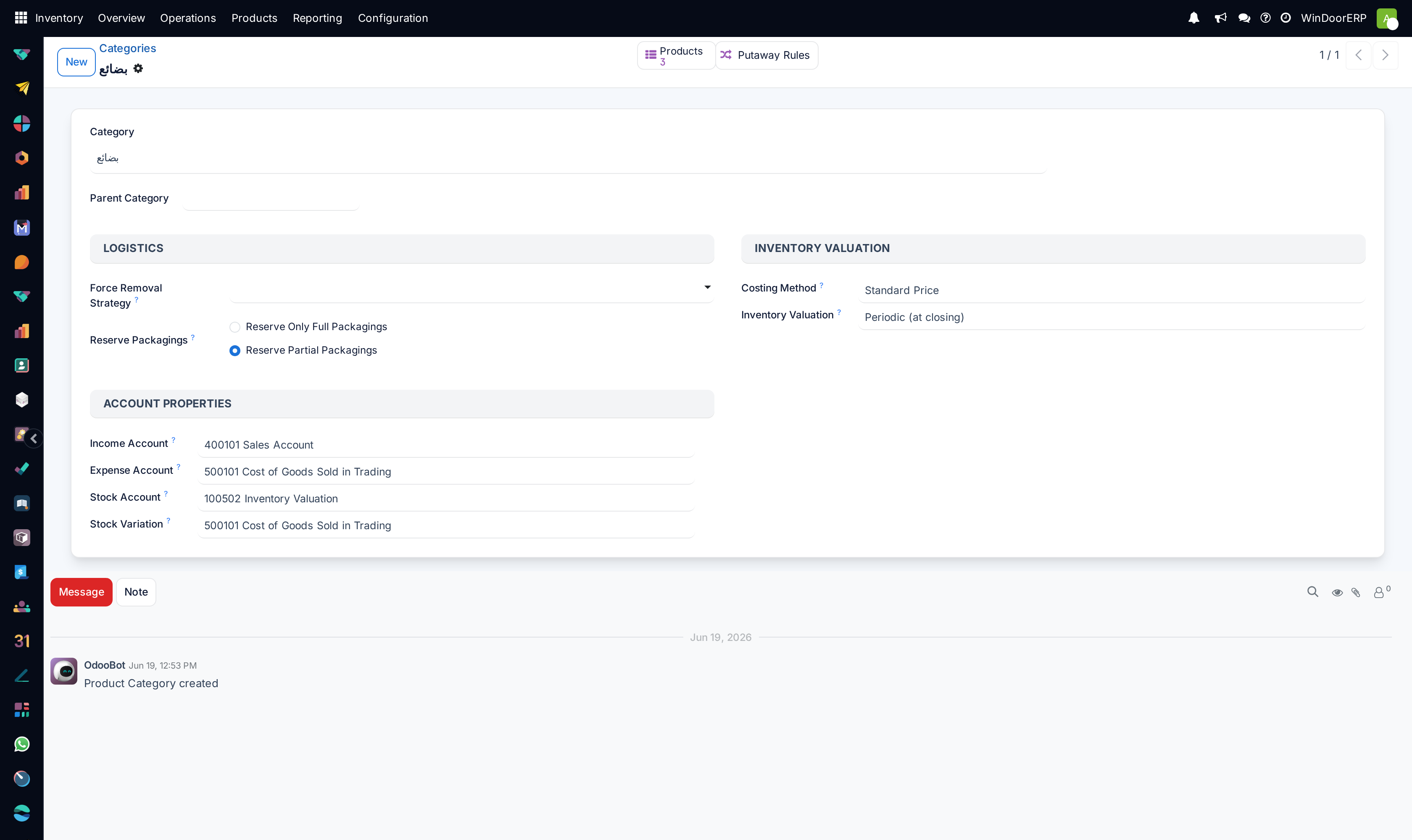
Set the Parent Category if this one sits inside another. Categories form a tree and the complete name shows the whole path.
-
04
Choose the Costing Method and Inventory Valuation.
-
05
Set the accounts if valuation is perpetual, so movements have somewhere to post.
-
06
Save, and check # Products to see how many products the choice affects.
The two decisions that matter
| Costing Method | Standard Price — every unit is valued at the cost you type, and differences go to a price-difference account. First In First Out (FIFO) — units are consumed in the order they arrived, at what each actually cost. Average Cost (AVCO) — a running weighted average across receipts. |
|---|---|
| Inventory Valuation | Periodic (at closing) — stock value is not posted as goods move; the accounts are adjusted when the period is closed. Perpetual (at invoicing) — every movement posts to the accounts as it happens. |
For a fabricator buying aluminium at a price that moves, FIFO or AVCO reflects reality; Standard Price is simpler but every purchase at a different price produces a variance somebody has to explain.
Perpetual valuation keeps the accounts continuously right at the cost of posting on every movement. Periodic is lighter and means the balance sheet is only correct after closing.
Every field on the category
| Name / Complete Name | The category, and its full path through the tree. |
|---|---|
| Parent Category | Where it sits. Routes and some settings are inherited downwards. |
| # Products | How many products carry this category — read it before changing anything. |
| Stock Valuation Account | Where stock value is held when valuation is perpetual. |
| Stock Journal | The journal the valuation entries are written in. |
| Income / Expense Account | Defaults for sales and purchases of these products. |
| Price Difference Account | Where the gap goes when a bill differs from standard cost. |
| Stock Variation Account | Where valuation changes are posted. |
| Routes | How products in this category are supplied. Inherited by child categories. |
| Force Removal Strategy | Which units are picked first — first in, last in, or nearest expiry. |
| Putaway Rules | Where incoming goods in this category are stored. |
| Product Properties | Extra fields that appear on products in this category. |
Designing the tree
Build categories around how things are valued and accounted for, not around how they are described. Aluminium profiles, glass, hardware and consumables are categories because they are costed and posted differently. "Windows for villas" is not.
Keep it shallow. Every level is a place a setting can be inherited from and therefore a place a surprise can come from; three or four categories that map to real accounting treatment beat thirty that map to a price list.
Troubleshooting
| Stock movements post nothing to the accounts | Valuation is Periodic. That is by design — the accounts move at closing. |
|---|---|
| Valuation posts fail | Perpetual valuation with the accounts left empty. Fill in the stock valuation account and journal. |
| Cost changed on its own | AVCO recalculates the average on every receipt. That is the method working. |
| A large one-off entry after changing the method | Changing costing revalues existing stock and posts the difference. Expected, and a reason to decide before trading. |
| Two companies show different settings | Valuation and costing are per company. Check which company is active. |
| A category cannot be deleted | Products or history reference it. Archive, or move the products first. |
Common mistakes
- Using categories to organise the catalogue instead of tags, and ending up with accounting settings scattered across dozens of them.
- Changing the costing method on a category that already has stock, then being surprised by the revaluation entry.
- Choosing perpetual valuation and leaving the accounts blank.
- Assuming a setting is global when it is stored per company.
- Building a deep tree and losing track of which level a setting was inherited from.
Was this article helpful?
Thanks — your feedback helps.
Running a window or door factory?
Ask for a demo