Pick the newest stock first (LIFO)
What this does
Last in, first out: every reservation takes the stock that arrived most recently and works backwards from there. It is the mirror image of FIFO, and it exists for the rack where the newest parcel is the only reachable one — bar stock loaded front to back, sheet material laid one sheet on top of the last. In WindoorERP it is one of four removal strategies, a policy you set once on a product category or a storage location. It changes nothing about what a picker is physically able to do; it changes which parcel of stock the system reserves, and therefore which one the operation line tells them to fetch.
Before you start
- Inventory Administrator access. Removal strategies live under Configuration, which plain Inventory users cannot open.
- Nothing to install and nothing to switch on. Every quantity in stock already carries an Incoming Date, and that date is the only thing LIFO reads.
- Know which of the two places you are going to use. On this system the reachable one is the product category: the location form carries a Removal Strategy field too, but the Locations menu is gated on Manage Multiple Stock Locations and nobody holds that permission here.
Steps
-
01
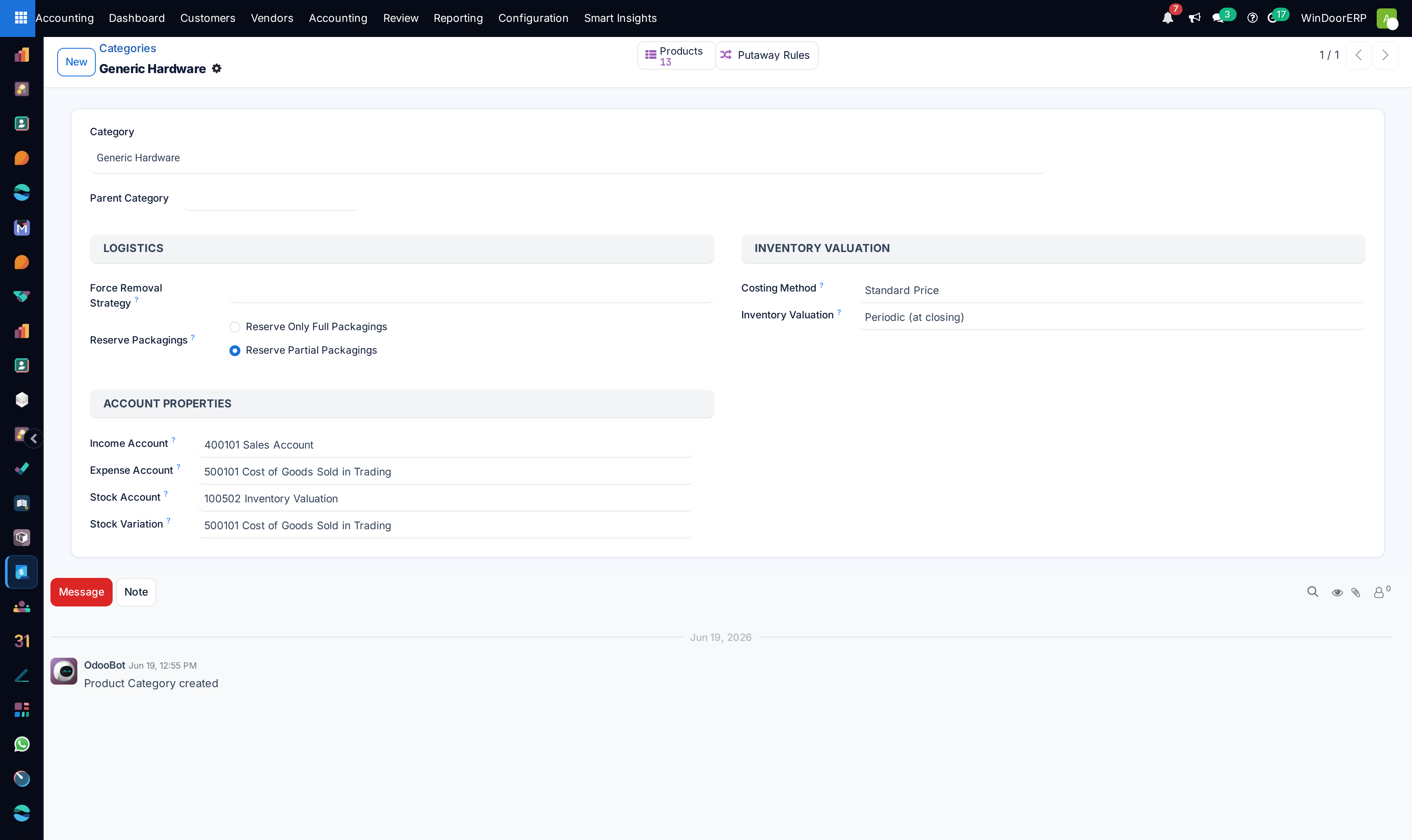
Open Inventory › Configuration › Products › Categories and select the category whose stock you want reserved newest-first.
-
02
In the Logistics block, set Force Removal Strategy to Last In First Out (LIFO). The list offers exactly four entries — First In First Out (FIFO), Last In First Out (LIFO), Closest Location and Least Packages — and you cannot type a new one into it.
-
03
Save. The field is tracked, so the change is written into the category's chatter and who set this policy, and when, stays recoverable.
-
04
Understand what you just accepted: "force" is meant literally. A category's strategy beats any location strategy for every product in that category, in every warehouse, at every reservation.
-
05
From the next Check Availability onwards the newest stock is taken. Reservations that already exist keep the parcels they are holding until somebody unreserves them.
What LIFO actually reads
On-hand stock is not one number. It is a set of parcels, one per combination of product, location, lot or serial, package and owner, and each parcel carries its own arrival date. A removal strategy is nothing more than the order those parcels are put in before the reservation walks down the list taking what it needs. LIFO sorts them by Incoming Date descending — newest first — and, where two parcels share the same instant, takes the one created most recently. FIFO is the same sort the other way up. Nothing else is consulted: not quantity, not cost, not the destination, not the shelf.
Where the date comes from
The Incoming Date is stamped when goods enter a location and it is read-only — there is no field on any screen that lets you edit it directly. It follows the units when they are moved between internal locations, so shifting old profile to a different rack does not make it young again. It exists whether or not the product is tracked, which is why the folklore that "LIFO needs lot tracking" is wrong. What lots add is separation and proof: with lots each intake keeps its own parcel and its own date, and the picking line names the exact lot to take.
Merging never makes a pile younger — and that blunts LIFO
When new goods land where identical untracked stock already sits, they do not form a second parcel: they merge into the existing one, and the merged parcel keeps the oldest of the dates involved. The code says so in as many words — "we consider only the oldest one as being relevant". For FIFO that is conservative and safe. For LIFO it is the opposite: topping up a pile never makes it the newest, so LIFO can only distinguish parcels that stay apart, which means different lots, packages, owners or locations.
Warning
Follow that through on this system and the honest answer is that LIFO will usually change nothing. Lots and serial numbers are switched off for users, packages are switched off, there are no stock owners, and there is a single internal location — WH/Stock. Under those conditions a product's on-hand stock is one parcel, and one parcel sorts the same way in every direction. Set LIFO if you want the policy recorded for the day tracking or extra locations arrive; do not set it expecting today's pickings to change.
Tracked stock jumps the queue
One rule outranks the strategy entirely. After the parcels are sorted — by LIFO or by anything else — the ones carrying a lot or serial number are moved to the front. So a six-month-old tracked parcel is consumed before a brand-new untracked one of the same product, LIFO or not. The system prefers to empty identified stock first, and that preference is applied last, on top of whatever order you chose.
Where the strategy can be set, and which one wins
| Where | Field, and how it is resolved |
|---|---|
| Inventory › Configuration › Products › Categories, Logistics block | Force Removal Strategy. Checked first and, if set, decisive — nothing overrides it. Its help text spells out each option, including a FEFO line that does not apply here. |
| Inventory › Configuration › Warehouse Management › Locations, Logistics block | Removal Strategy, as a radio of the four options. Consulted only when the category is empty, and a location with nothing set inherits from its parent, and its parent's parent, up the chain. The menu needs Manage Multiple Stock Locations; the block itself is hidden on customer, supplier, production and scrap locations. |
| Neither | FIFO. That is the fallback written into the code, not a value stored anywhere — which is why an empty field is not "no policy". |
There is no expiry-based FEFO in either list. That strategy belongs to expiration-date tracking, which is not installed on this system, so the fourth option you might expect simply is not offered.
What LIFO is not, here
It is not a costing method. LIFO has a reputation as an accounting policy — the one many jurisdictions refuse — but that reputation belongs to LIFO cost flow, deciding which purchase price is charged to a sale. This fleet costs stock at Standard Price, so the cost of a delivered unit is the product's standard cost whichever parcel was reserved. Setting LIFO as a removal strategy does not change a single figure in the accounts, and it does not need an accountant's blessing. If somebody is actually asking for LIFO valuation, that is a different conversation about costing method, not this field.
It is also not traceability. LIFO decides which parcel is reserved; it cannot tell you afterwards which physical bar or sheet left the rack unless the product is tracked by lot or serial, and that tracking is a separate feature that is off for users on this system.
Troubleshooting
Set LIFO and nothing changed — most likely there is only one parcel to choose from, which is the normal case here (see the warning above). Check the product's on-hand stock in Inventory › Reporting › Stock: if it is a single line, no strategy can behave differently from any other.
The picker was sent to older stock anyway — either the reservation predates your change, or the older parcel carries a lot or serial and was therefore promoted ahead of the untracked newer one. Unreserve and re-check availability to test the first; look at the parcel's lot to test the second.
A location strategy is being ignored — the product's category has a Force Removal Strategy set. Clear it if you want the location to decide.
The strategy list has no FEFO — correct. Expiration-date tracking is not installed, and without it the strategy does not exist to be chosen.
Common mistakes
- Setting LIFO on material that ages — gaskets, sealant, coated profile. The oldest parcel then never moves, and rotation is the whole reason those products are watched.
- Treating it as an accounting decision on a system that costs at standard price, and holding the change up for a sign-off nobody needs to give.
- Setting it on a location and expecting it to apply, when the category's Force Removal Strategy is already filled in.
- Expecting a strategy change to re-shuffle transfers that are already reserved. It never does — it applies from the next reservation.
Was this article helpful?
Thanks — your feedback helps.
Running a window or door factory?
Ask for a demo