Set up product attributes for profiles, colours, and glass
What this does
Attributes are the characteristics a product comes in — profile colour, glass thickness, hardware finish. Attach them to a product and WindoorERP can create a variant for each combination.
The important setting is not the list of values. It is Variant Creation, which decides whether attaching an attribute creates hundreds of product records or none at all.
Before you start
- Administrator rights on Inventory ▸ Configuration ▸ Attributes.
- Count the combinations before you attach anything. Two attributes with ten values each is a hundred variants.
- Decide whether you need to hold stock per combination. That is the only reason to create variants at all.
Steps
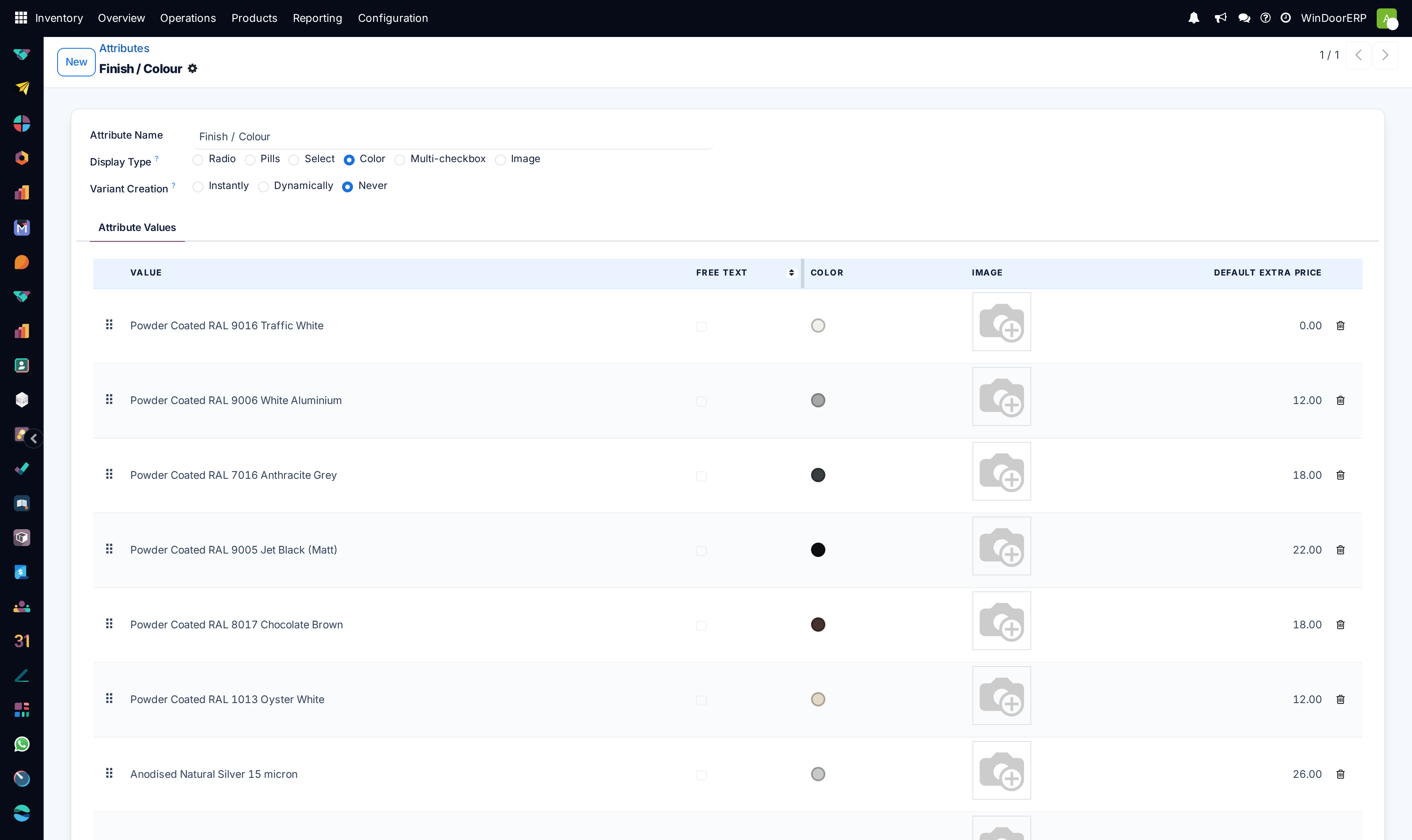
-
01
Open Inventory ▸ Configuration ▸ Attributes and click New.
-
02
Name the Attribute — Colour, Glass thickness, Finish.
-
03
Set Variant Creation before adding values. It is the decision this screen exists for.
-
04
Add the Values, one line each.
-
05
Choose a Display Type for how the choice is presented.
-
06
Save, then attach the attribute to a product template on its Attributes tab.
Variant Creation — the setting that matters
| Instantly | Every combination becomes a real product variant the moment the attribute is attached. Right when you hold stock per combination — RAL 9016 profile is genuinely different stock from RAL 7016. |
|---|---|
| Dynamically | A variant is created only when a combination is actually used on an order. Right for a large matrix where most combinations never occur. |
| Never | The choice is recorded on the order line but no variant exists. Right for something that changes the price or the specification but not the stock — a finish applied to order. |
Multiply before you choose. Three attributes with five values each set to Instantly is 125 product records, each with its own stock, its own cost and its own line in every report.
Every field on an attribute
| Attribute | The name of the characteristic. |
|---|---|
| Values | The options. Adding a value to an attribute already used Instantly creates new variants on every product that carries it. |
| Variant Creation | Instantly · Dynamically · Never. Change it before the attribute is in use, not after. |
| Display Type | Radio · Pills · Select · Color · Multi-checkbox · Image. Presentation only — Color and Image are worth it for finishes people choose by eye. |
| Sequence | The order attributes appear in. |
| Related Products | Which product templates use this attribute. Check it before editing anything. |
| Active | Archive rather than delete once an attribute has been used. |
Attributes or separate products?
Use an attribute when the thing is genuinely the same product in different guises, and you want one catalogue entry with variants beneath it.
Use separate products when the items have different suppliers, different lead times or different units — two profile series are two products, not one product with a series attribute.
For a window that is configured rather than picked from a list, neither applies: that is what the designer is for, and the configuration lives on the order line.
Troubleshooting
| Hundreds of products appeared | Instantly with a large matrix. Removing the attribute does not delete variants that have history. |
|---|---|
| The variant I want does not exist | The attribute is Dynamically; it is created when first used. |
| Stock cannot be held per option | The attribute is Never, so there is no variant to hold stock against. |
| Variant Creation cannot be changed | The attribute is already used on products. Remove it from them first, or create a new attribute. |
| Adding one value created many products | Expected with Instantly — the new value combines with every existing one. |
| An attribute cannot be deleted | Products reference it. Archive it. |
Common mistakes
- Leaving Variant Creation on Instantly for a matrix nobody stocks, and flooding the catalogue.
- Adding values to a live attribute without counting what it multiplies out to.
- Using attributes to record something that only changes the price — Never exists for that.
- Modelling two profile series as one product with an attribute.
- Deleting an attribute instead of archiving it, and breaking the products that used it.
Was this article helpful?
Thanks — your feedback helps.
Running a window or door factory?
Ask for a demo