Pick from the nearest location
What this does
Closest Location is the removal strategy that claims to save the picker a walk: when a product sits in several places, take it from the near one. What it actually does is sort the candidate locations alphabetically by their full path and take from the first. That is a useful approximation of "closest" if — and only if — your locations were deliberately named in walking order. It is not a floor plan, it does not know where the packing bench is, and it never looks at where the goods are going. This article documents the mechanism honestly, because the difference between the two descriptions is where every disappointment with this strategy comes from.
Before you start
- More than one internal location holding the same product. With a single stock location there is nothing to be closest to, and this system currently has exactly one —
WH/Stock. - Location names that follow the route. The sort is on the name, so the naming is the routing; if names record history rather than geography, "closest" sends the picker across the yard.
- Inventory Administrator access. To use the location form as well as the category form you also need Manage Multiple Stock Locations, which is what puts the Locations menu on screen — and which nobody holds on this system today.
Steps
-
01
Decide the scope. Set it on a location and it covers that location and everything beneath it; set it on a product category and it covers those products wherever they are, overriding every location.
-
02
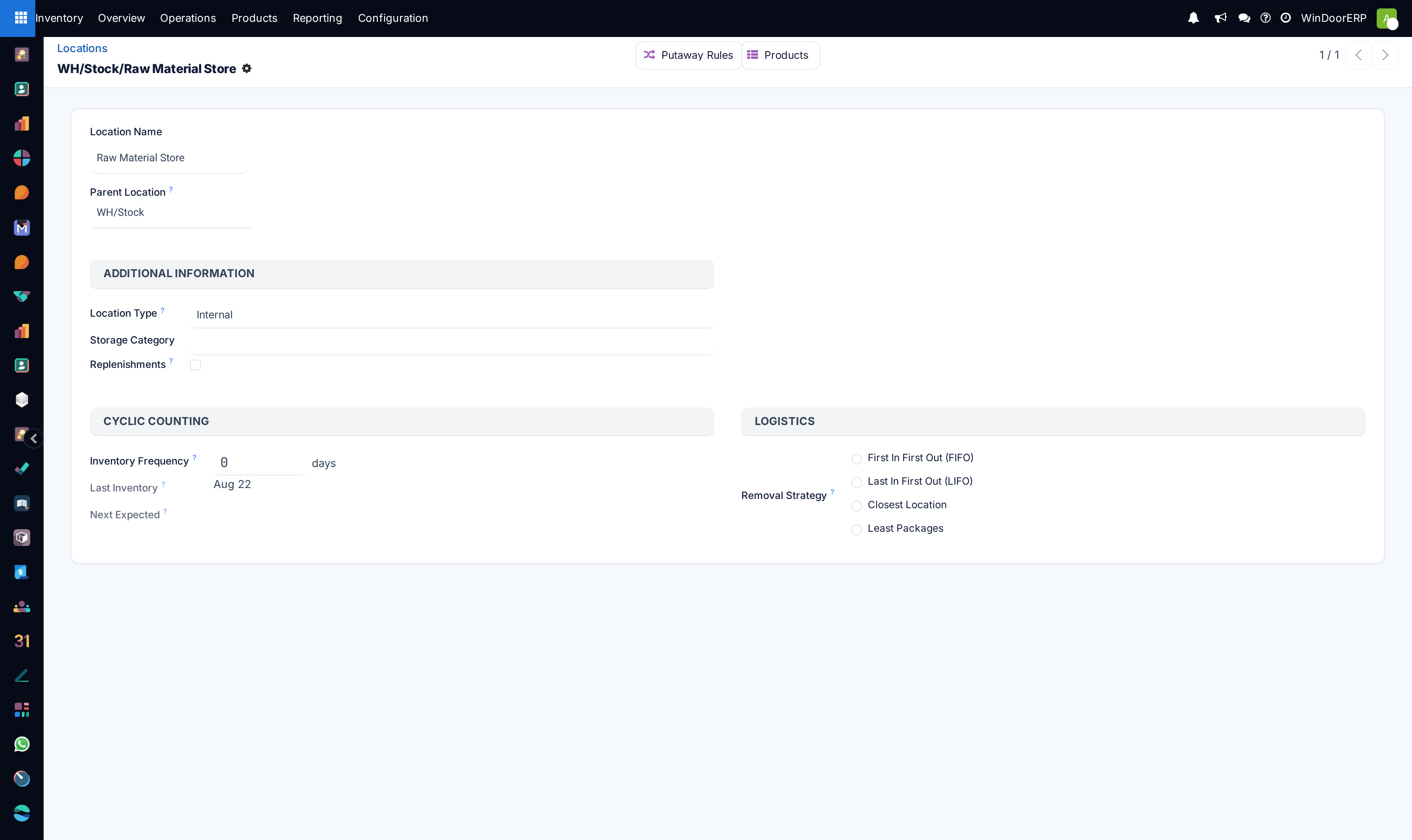
For the location route, open Inventory › Configuration › Warehouse Management › Locations and select the parent of the alphabetically named sub-locations — typically
WH/Stockrather than one shelf. -
03
In the Logistics block, choose Closest Location from the four radio options. The block only appears on view, internal and transit locations; a customer or scrap location has no Logistics block at all.
-
04
For the category route instead, open Inventory › Configuration › Products › Categories and set Force Removal Strategy to Closest Location. Despite what older documentation says, this strategy is not location-only — the category list offers it, and a category setting wins over every location.
-
05
Save, then test with a real reservation. The order applies from the next Check Availability; nothing already reserved is re-shuffled.
How "closest" is actually decided
Once the candidate parcels of stock have been gathered, this strategy sorts them by the full path of the location each one sits in — the complete name, WH/Stock/Shelf 1 and not just Shelf 1 — in plain ascending text order, and the reservation then works down that list until the demand is covered. Because the path includes the parents, the parent names dominate: everything under WH/Stock/Aisle A is exhausted before anything under WH/Stock/Aisle B is touched, no matter which shelf is physically nearer the door.
Important
The field's own help text reads "products/lots closest to the target location will be moved out first". Read literally that is wrong, and it is worth knowing before you plan around it: the destination is never consulted. The same location order is produced whether the goods are heading to the packing bench, to production, or to scrap. "Closest" means "first in the alphabet", and nothing else.
The sort is textual, and that bites
Names are compared as text, character by character, not as numbers and not case-insensitively. The consequences are entirely predictable once you know it, and entirely surprising if you do not:
Shelf 10comes beforeShelf 2, because1precedes2. Pad your numbers —Shelf 02,Shelf 10— and the order behaves.- Capitals sort before lower case, so
Zone Bcomes beforeZone a. Pick one convention per warehouse and hold to it. - A leading space, a hyphen or a slash in a name changes its position. Names are data here, not decoration.
- Renaming a location silently re-routes every future pick from it. The strategy holds no copy of the old order.
What happens inside one location
When several parcels sit in the same location, the tie is broken by the parcel record's own identifier, highest first — which in practice means the most recently created parcel is taken first. This is worth stating plainly because the intuitive assumption is the opposite: Closest Location does not fall back to FIFO within a location, and choosing it quietly abandons date-based rotation for the stock it governs. If rotation matters more than walking distance for a family of products, FIFO on its category is the right answer, not this.
One rule then overrides everything above. After the sort, parcels carrying a lot or serial number are promoted to the front of the list, whatever location they are in. Identified stock is always consumed before untracked stock of the same product.
Where it can be set, and which one wins
| Where | Field, and how it is resolved |
|---|---|
| Inventory › Configuration › Products › Categories, Logistics block | Force Removal Strategy. Checked first; if it is set, it decides, and no location can override it. |
| Inventory › Configuration › Warehouse Management › Locations, Logistics block | Removal Strategy, a radio of the four options. Consulted only when the category is empty. A location with nothing set inherits from its parent and, failing that, from its parent's parent, all the way up — which is why setting it once on WH/Stock is usually enough. |
| Neither | FIFO, as the built-in fallback. An empty field is a policy, not the absence of one. |
Two claims from older Odoo documentation do not hold here and are worth retiring. The first is that Multi-Step Routes must be enabled for this strategy — it need not; the Locations menu is gated on Manage Multiple Stock Locations alone, and Multi-Step Routes governs routes and rules, which have nothing to do with removal order. The second is that Closest Location can only be applied at the location level; the product category offers it too, and takes priority when it does.
Whether it will do anything on this system
Today, no. There is one active internal location, WH/Stock, and no product category or location on this system sets a removal strategy at all — so everything reserves FIFO by default and Closest Location has nothing to sort. The strategy becomes meaningful the day stock is genuinely split across named sub-locations, which needs Manage Multiple Stock Locations granted and the sub-locations created and named. Ask for that as a change to how the warehouse is modelled, not as a switch: it changes reservation, putaway, counting and the columns on the picking sheet all at once.
Troubleshooting
Closest Location sends the picker to a far shelf — the sort is alphabetical on the full path. Either rename the locations into deliberate walking order, or accept the alphabet; there is no third setting.
Setting it changed nothing — the product's stock is in one location, or the reservation already existed. Check the on-hand split under Inventory › Reporting › Stock, and unreserve then re-check availability to re-apply the order.
There is no Locations menu — it needs Manage Multiple Stock Locations. Until that is granted, the category's Force Removal Strategy is the only place this strategy can be set.
Reporting › Locations is missing too — the same permission gates it. Use Inventory › Reporting › Stock to see what is on hand while multi-location is off.
A location setting is being ignored — the product's category has a Force Removal Strategy filled in, and that always wins. Clear it to hand the decision back to the location.
Common mistakes
- Naming locations after what used to be stored in them and then trusting "closest" — the alphabet is the route, and history is not a route.
- Numbering shelves without padding, so
Shelf 10is permanently picked beforeShelf 2. - Setting it on one shelf rather than on the parent, so the sort has a single candidate and never does anything.
- Using it for material that ages. Nothing in this strategy looks at a date, and inside a location it takes the newest parcel first.
Was this article helpful?
Thanks — your feedback helps.
Running a window or door factory?
Ask for a demo