Limit what a location can hold
What this does
A storage category puts a ceiling on a location — so many kilos, so many units of a product, so many packages of a type — and says whether the location may hold a mixture at all. Attach it to the bays under a rack and a putaway rule can then pick the bay that still has room.
It is the only part of WindoorERP that knows a shelf can be full. Nothing else in Inventory refuses a movement because a location is at capacity: you can always put ten pallets into a one-pallet bay by typing the location on the transfer. A storage category changes what the system suggests, not what it permits.
Where this stands on your system
Storage categories sit behind the Storage Locations setting, which is off for ordinary users here, so Inventory ▸ Configuration ▸ Warehouse Management ▸ Storage Categories is not in the menu and no categories exist on this installation.
There is no separate setting for storage categories in WindoorERP 19 — older versions had one, and instructions that tell you to look for it are out of date. Storage Locations is the whole gate; Packages is needed additionally only for the per-package-type limits.
Important
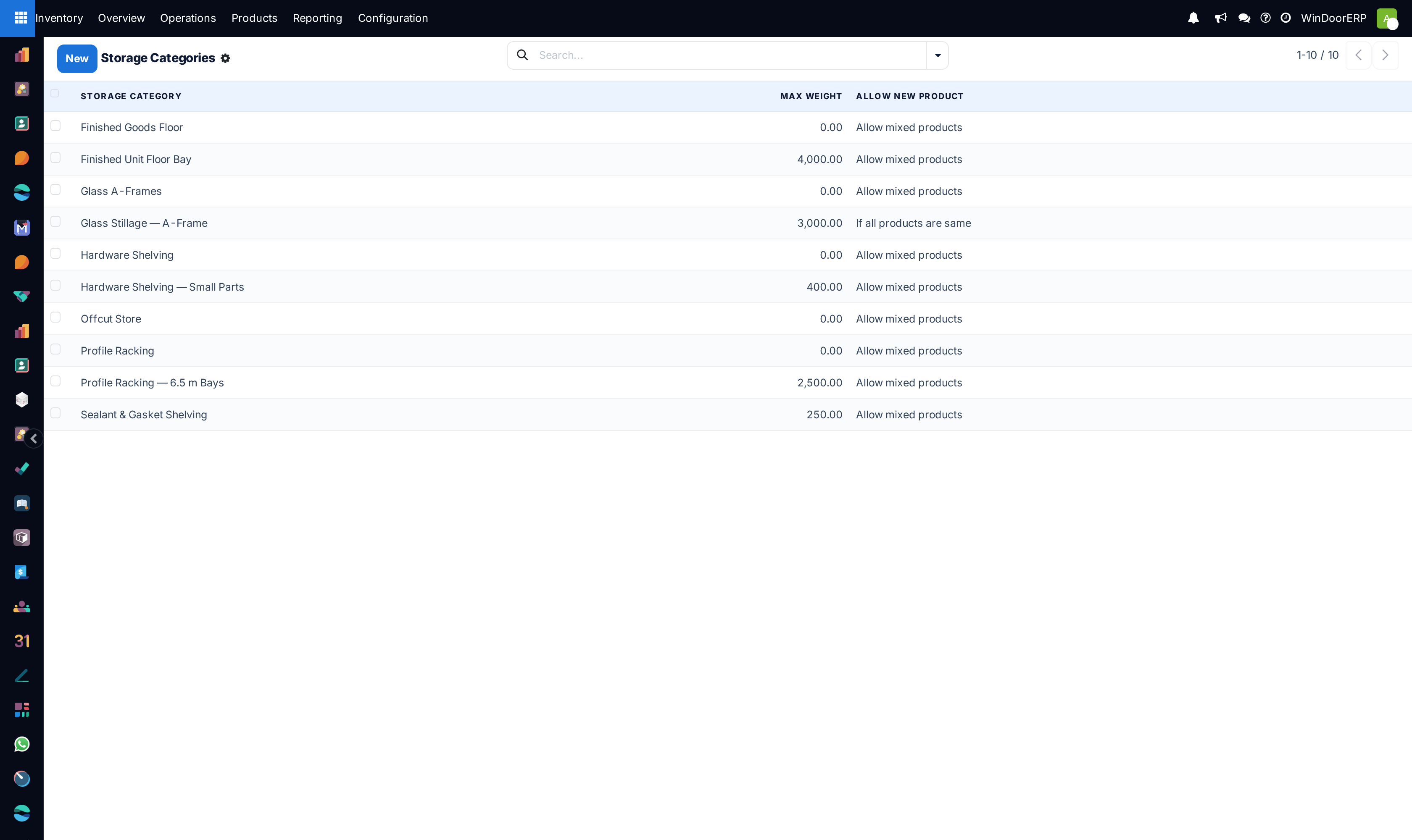
A storage category does nothing on its own. It is read by exactly one thing: a putaway rule whose Sublocation is set to Closest Location. The demonstration warehouse behind this manual's screenshots has ten categories attached to eleven bays and not one putaway rule that consults them — which is a common and entirely silent state to be in. Check your rules, not your categories, when limits appear to be ignored.
Before you start
- Storage Locations on, in Inventory ▸ Configuration ▸ Settings under Warehouse.
- Packages on as well, but only if you intend to limit a bay by how many crates or pallets it holds rather than by product quantity or weight.
- A parent location with children. The putaway rule points at the parent; the categories go on the children. A category on the parent is never consulted, because the rule looks inside the Store to location.
- Weights on your products, if you intend to use Max Weight. A weight limit against products that carry no weight never rejects anything.
Steps
-
01
Go to Inventory ▸ Configuration ▸ Warehouse Management ▸ Storage Categories and click New.
-
02
Name it after the constraint, not the contents — Profile Racking — 6.5 m Bays, Glass Stillage. The field is labelled Storage Category.
-
03
Set Max Weight if weight is the real limit, and read the warning about zero below before you leave it blank.
-
04
Choose Allow New Product: mixed, same product only, or empty only.
-
05
Add lines under Capacity by Product, and under Capacity by Package if you have the Packages setting on.
-
06
Save, then open each bay under Inventory ▸ Configuration ▸ Warehouse Management ▸ Locations and set its Storage Category. The field only appears on locations whose Location Type is Internal.
-
07
Finally, open the putaway rule that feeds those bays, set Sublocation to Closest Location and pick the category in Having Category. Until you do this the category is inert.
The storage category form
| Storage Category | The name. Required. Not translated — whatever you type is what every user sees, in every language. |
|---|---|
| Max Weight | The heaviest total the location may carry, in your weight unit, which is shown beside the field. Must not be negative: "Max weight should be a positive number." |
| Allow New Product | Whether the location may take something it does not already hold. Three values, below. Defaults to Allow mixed products. |
| Company | Leave empty — placeholder Visible to all — to share the category across companies. |
| Locations | A button at the top of the form listing every location that carries this category. The quickest way to check a category is actually attached to something. |
| Capacity by Product | A tab. One line per product: Product, Quantity and the product's unit. Only storable products can be listed. |
| Capacity by Package | A tab, shown only with the Packages setting on. One line per package type: Package Type and Quantity. |
A capacity line's quantity must be above zero — "Quantity should be a positive number." — and each product and each package type may appear only once in a category, enforced with "Multiple capacity rules for one product." and "Multiple capacity rules for one package type."
Allow New Product
| If the location is empty | The bay is only offered when it holds nothing at all. Use it for a bay that is dedicated to one consignment at a time. |
|---|---|
| If all products are same | The bay is only offered when what is already there is the same product. It also refuses if a transfer that is not yet done is already bringing a different product to that bay — so two arrivals on the same day cannot both claim it. |
| Allow mixed products | Anything may share the bay. The default, and the right answer for general racking. |
How the limit is actually applied
When a putaway rule in Closest Location mode looks for somewhere to put an arrival, it tests each candidate bay in turn and takes the first that passes every one of these checks. Bays that already hold the product — or a package of the same type — are tested first, so goods join their own kind before opening a fresh bay.
| Mixing | Rejected if Allow New Product forbids what is already there, or already on its way there. |
|---|---|
| Weight | Rejected if the bay's current weight plus the weight of what is arriving exceeds Max Weight. This check runs for every category, always. |
| Product capacity | Rejected if the bay is already at its limit for that product, and also if the arriving quantity would take it past the limit. A capacity of ten with two on the shelf will not accept nine. |
| Package capacity | Rejected only if the bay is already at its limit for that package type. It does not check whether the arriving packages would overshoot — a two-pallet bay holding one pallet will accept two more. |
If no bay passes, the goods go to the putaway rule's Store to location itself. That location normally carries no category and therefore no limit, so the practical effect of "everything is full" is a pile at the front of the rack, not a refusal.
Max Weight left at zero
The weight check is not skipped when Max Weight is zero — zero is treated as the limit. A category with Max Weight 0.00 rejects every product that has a weight recorded against it, and the goods fall back to the parent location instead. The bays then look permanently full and nothing explains why.
If you do not want a weight limit, do not use one: leave the category's capacity to the product or package lines and set Max Weight high enough to be irrelevant. Several categories on the demonstration warehouse in the screenshot sit at 0.00 and would behave exactly this way.
Attaching a category to a location
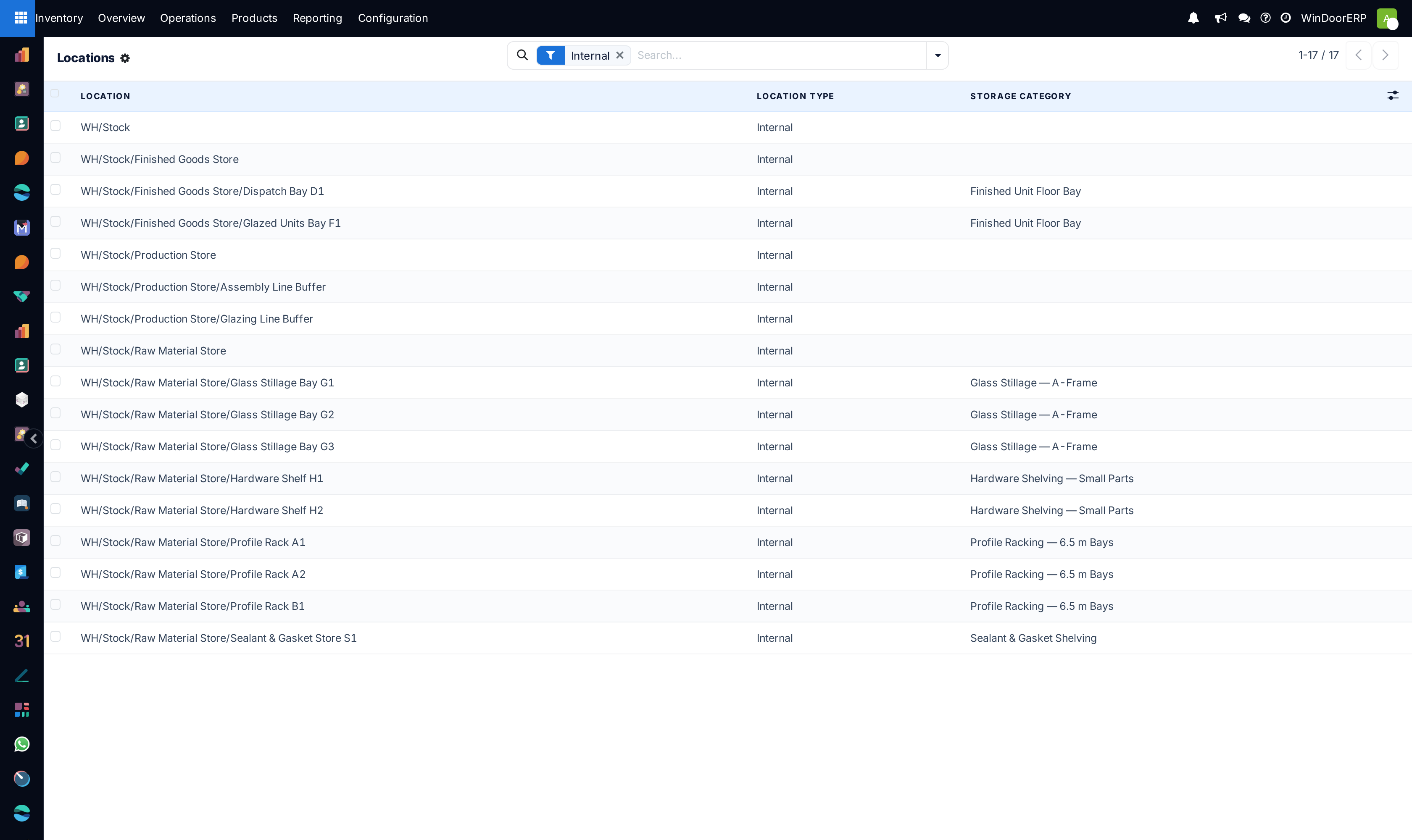
Open the bay under Inventory ▸ Configuration ▸ Warehouse Management ▸ Locations and set Storage Category in the Additional Information group. The field is only shown when Location Type is Internal, which is correct — only internal locations hold sellable stock.
The list view shows the same field as a column, which is the fastest way to see the pattern: parents blank, leaf bays categorised.
What storage categories will not do
They do not split a quantity across bays. Putaway picks one location for the whole line; if you need eight bars in one bay and four in another, split the line by hand on the transfer.
They do not block anything a person types. A location typed directly onto a transfer is accepted whatever its category says, and no warning appears.
They do not apply to deliveries or to internal transfers you create yourself. The check runs when putaway is asked for a destination, which is on arrivals.
See also
Send arriving goods to the right shelf covers the putaway rule itself, and is the article to read first — a storage category with no rule pointing at it does nothing. Create storage locations covers building the parent-and-children tree this depends on.
Troubleshooting
| There is no Storage Categories menu | Storage Locations is off. There is no separate storage-category setting in WindoorERP 19. |
|---|---|
| The Capacity by Package tab is missing | The Packages setting is off. Capacity by product and by weight still work without it. |
| Goods ignore the limits entirely | Almost always the putaway rule: Sublocation must be Closest Location and Having Category must name the category. On any other setting the category is never read. |
| Nothing ever routes to the bays | Check Max Weight. Zero means zero, and it rejects every product with a weight. |
| The bays are ignored but the parent fills up | That is the fallback. Every candidate bay failed a check, so the goods stayed at the Store to location. |
| A full bay still accepted more packages | Package capacity is only tested as "is it already at the limit". A bay one below its limit accepts an arrival of any size. |
| Storage Category is not on the location form | The location's Location Type is not Internal. Virtual, vendor and customer locations do not carry categories. |
| The system will not save a second line for the same product | One capacity line per product per category: "Multiple capacity rules for one product." Edit the existing line. |
Common mistakes
- Creating categories and never pointing a putaway rule at them, which is the state most sites are in without knowing it.
- Leaving Max Weight at zero on a category whose products have weights, which silently blocks every bay it is on.
- Putting the category on the parent location instead of the children.
- Expecting an arrival to be split across two bays when the first is full. It is not: one line, one location.
- Treating a capacity as a rule the system enforces. It is a suggestion; a typed location always wins.
- Setting If all products are same on general racking and then finding half the warehouse falls back to the parent.
Was this article helpful?
Thanks — your feedback helps.
Running a window or door factory?
Ask for a demo