Configure units of measure and material packaging
What this does
Units of measure let you buy in one unit and use in another — buy profile by the bar and consume it by the millimetre, buy glass by the sheet and cut it by the square metre.
Odoo 19 changed how units are defined. A unit is now described relative to another unit, and the old category-and-factor model is gone. Anything you read elsewhere about unit-of-measure categories describes an older version.
Before you start
- Administrator rights on Inventory ▸ Configuration ▸ Units & Packagings.
- Get the relationship right before anything is bought or sold in the new unit. Changing a factor later reinterprets every quantity already recorded in it.
- Units and packagings are one screen now — there is no separate categories screen and no separate packagings screen.
Steps
-
01
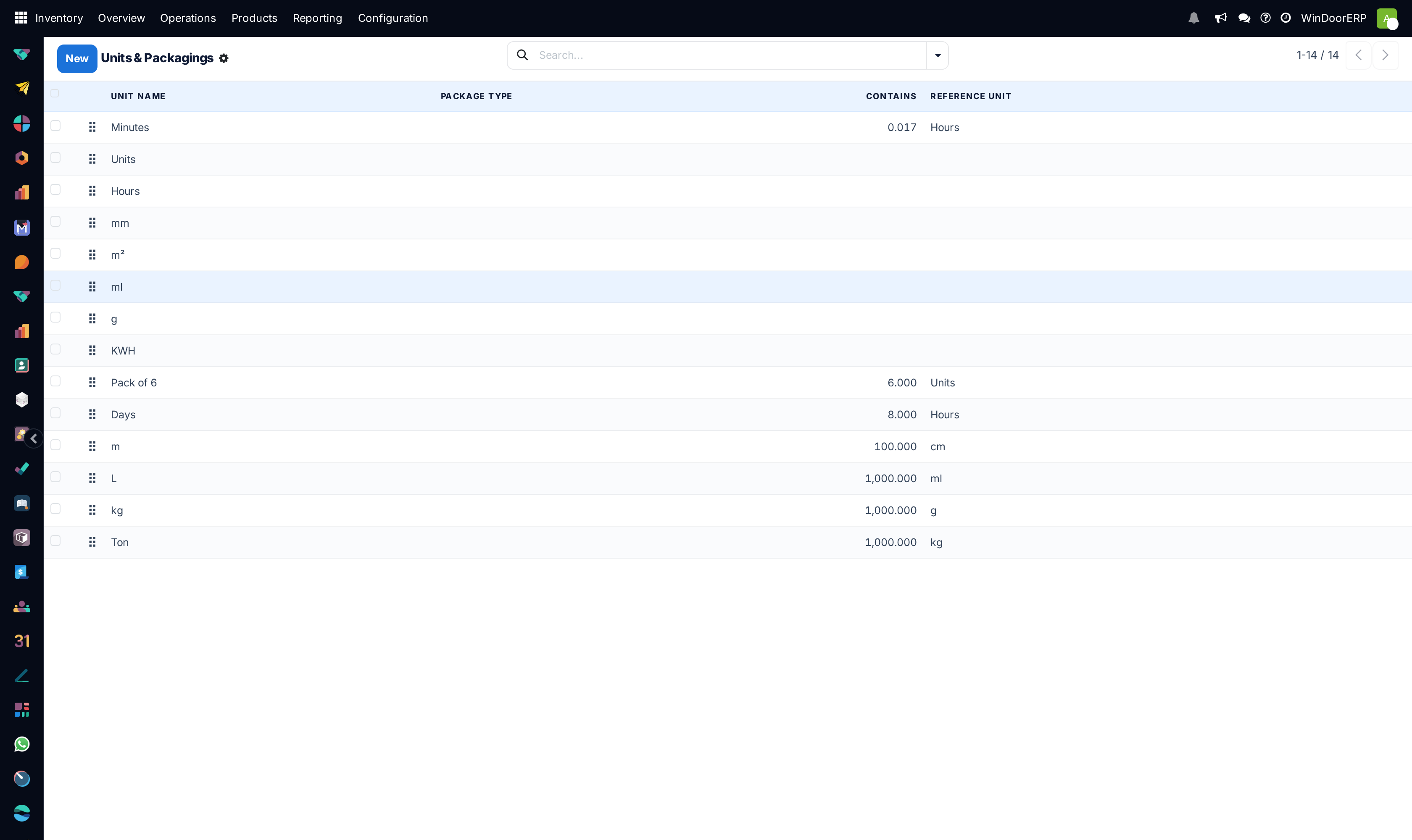
Open Inventory ▸ Configuration ▸ Units & Packagings.
-
02
Click New and give the unit a Unit Name.
-
03
Set Reference Unit — the unit this one is expressed in terms of.
-
04
Set Contains — how many of the reference unit make one of these. A centimetre contains 10 millimetres; a dozen contains 12 units.
-
05
Set Rounding Precision to the smallest quantity you actually work in.
-
06
Save, then set the unit on a product and check that a purchase and a consumption convert as you expect.
Every field on a unit
| Unit Name | What people call it — mm, cm, Units, Dozens, Pack of 6. |
|---|---|
| Reference Unit | The unit this one is defined against. This is what makes conversion possible; two units can only convert if they trace back to the same reference. |
| Contains | How many reference units make one of these. cm contains 10 mm. Getting this wrong misprices and mis-stocks everything measured in it. |
| Rounding Precision | The smallest step quantities are rounded to. Too coarse loses material; too fine produces quantities nobody can pick. |
| Active | Archive a unit you no longer buy or sell in rather than deleting it. |
Why this matters for fenestration
Aluminium arrives in bars of a fixed length and is consumed in millimetres of cut. Glass is bought as sheets and consumed as area. Hardware is bought in boxes and fitted per sash.
Setting the relationship correctly is what makes a purchase in one unit and a consumption in another agree — so the cost of a cut piece is a real fraction of the bar it came from, and stock falls by what was actually used.
Where a purchase unit and a stock unit genuinely differ, that is exactly what these fields are for. Where they do not, leave the product in one unit and save yourself the arithmetic.
Troubleshooting
| There is no Units of Measure Categories screen | Correct — it does not exist in this version. Units are defined relative to another unit instead. |
|---|---|
| A unit cannot be selected on a product | It does not trace back to the same reference unit. Conversion is only possible within one chain. |
| Quantities are out by a factor of ten | Contains is wrong. Fix it, but check what has already been recorded in that unit — existing quantities are reinterpreted. |
| Quantities show more decimals than we work in | Rounding Precision is finer than reality. |
| Stock does not fall by what was used | The product's stock unit and consumption unit do not relate as intended. |
| The unit cannot be changed on a product | It has stock or history in the current unit. Changing it would reinterpret that history. |
Common mistakes
- Looking for a unit-of-measure category. There is none in this version.
- Editing Contains on a unit already in use, and silently rewriting the meaning of every recorded quantity.
- Setting rounding finer than the shop floor can pick.
- Creating a second unit for something that is the same unit under another name.
- Changing a product's unit after it has stock.
Was this article helpful?
Thanks — your feedback helps.
Running a window or door factory?
Ask for a demo