Hold stock you do not own
What this does
Consignment stock sits in your warehouse and belongs to somebody else until it is sold. You store it, you can sell it, and you never buy it. It is how a profile or hardware supplier puts a colour range on your floor without you funding the inventory.
In WindoorERP the whole mechanism is one field on a receipt: Assign Owner. Name an owner and the goods are on your shelves, in your counts and in your reports, but out of your inventory valuation. Leave it empty and you have simply given yourself free stock on the balance sheet.
Where this stands on your system
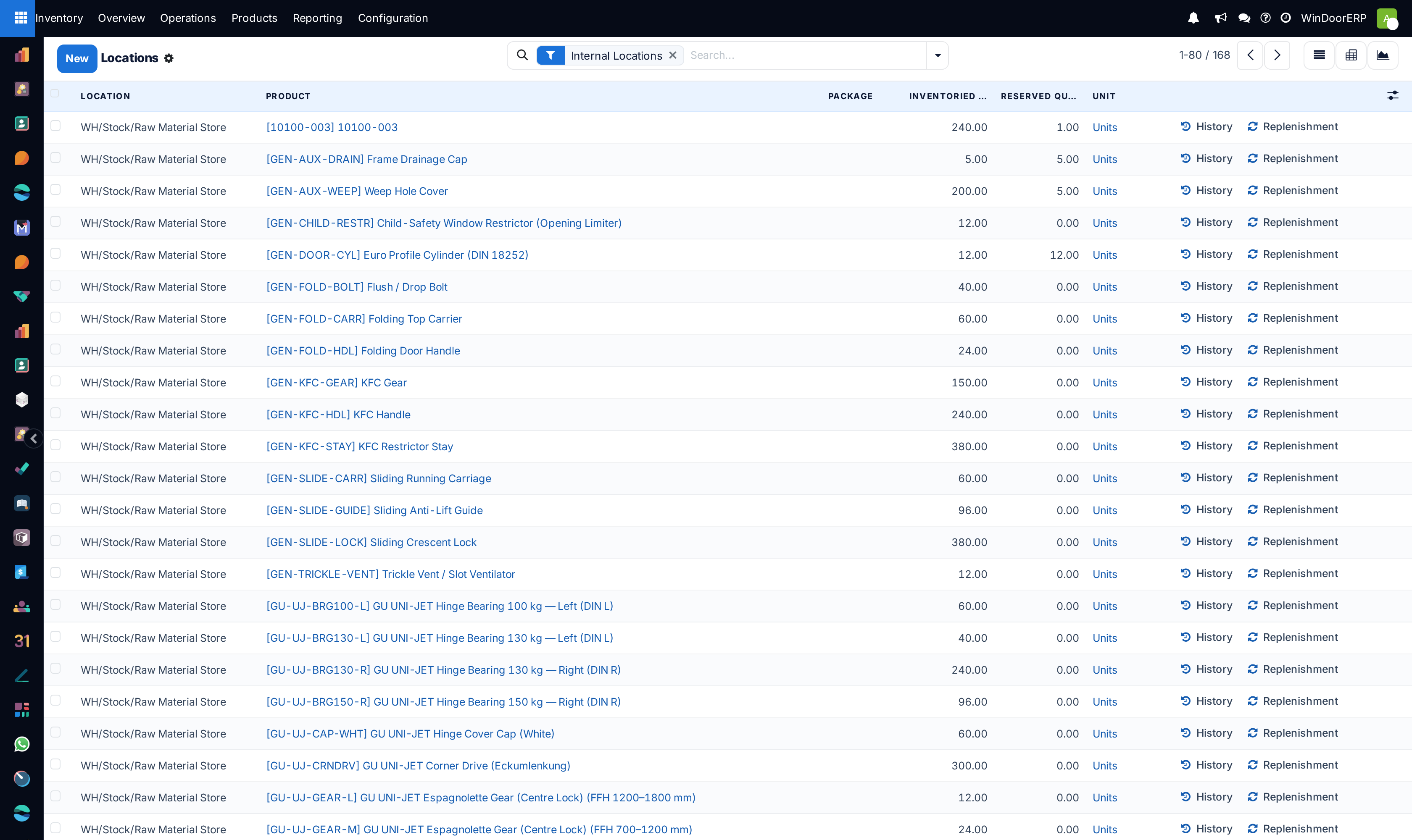
The field is behind the Consignment setting, which is off on this installation. There is no Assign Owner field on any transfer, no Owner column on any stock screen, and no owned stock recorded anywhere in the database. Everything below describes what turning that one setting on gives you.
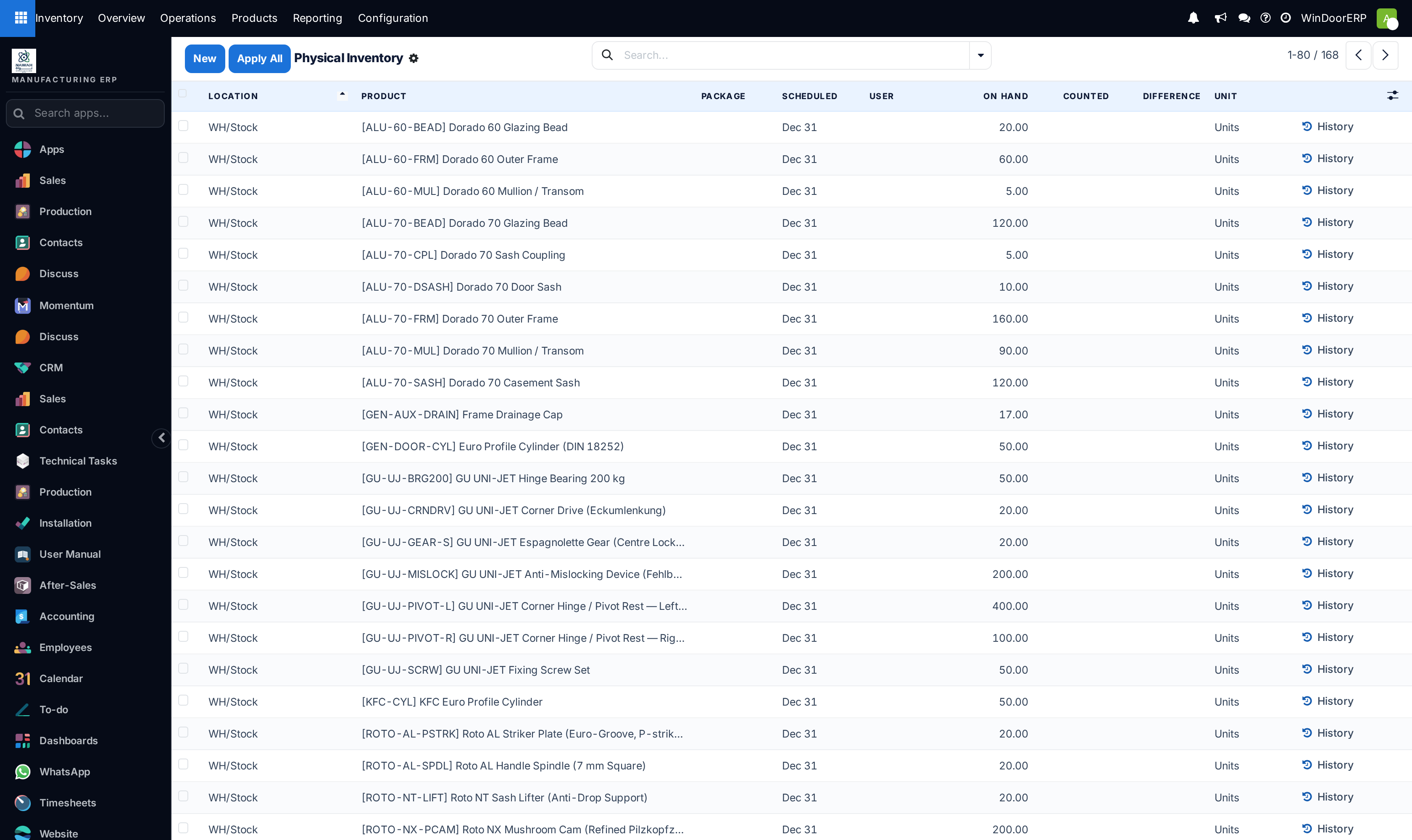
You can see the gap on the two screens that would carry the column. Today Inventory ▸ Reporting ▸ Locations shows Location, Product, Package, quantities and unit, and Inventory ▸ Operations ▸ Adjustments ▸ Physical Inventory shows Location, Product, Package, Scheduled, User and the count columns. Neither has an owner anywhere on it.
Before you start
- Administrator rights for Inventory ▸ Configuration ▸ Settings.
- A written agreement with the supplier. The system records who owns the goods; it does not record the terms, the storage fee or when title passes, and none of that is anywhere in WindoorERP.
- The supplier as a contact, because the same contact goes in two places on the receipt.
- A clear answer to one question before you start: who is allowed to sell it. Consigned goods are reservable by any order, and the system will not stop anyone.
Steps
Important
Assign Owner appears only on incoming transfers, and only while the transfer is open. Once a receipt is Done the field is read-only, and the ownership of what it brought in can no longer be corrected there — you would have to fix the ownership on the stock itself, in Physical Inventory. Set it before you validate.
-
01
Open Inventory ▸ Configuration ▸ Settings. In the Traceability block, tick Consignment — its subtitle reads Set owner on stored products — and click Save.
-
02
Go to Inventory ▸ Operations ▸ Transfers ▸ Receipts and click New. There is no purchase order: nothing was bought, so nothing generates the receipt for you.
-
03
Set Receive From to the supplier.
-
04
Set Assign Owner, in the right-hand column beside the dates, to the same supplier. This is the field that makes the goods theirs.
-
05
Add the products and set the Quantity column to what actually arrived.
-
06
Click Validate. The stock is now on your shelves and on their books.
What the owner field actually changes
Exactly one thing, and it is the thing that matters: stock whose owner is somebody other than your own company is excluded from valuation. Its value is zero, it contributes nothing to your stock value, and no accounting entry is made when it arrives or leaves. That is the entire accounting effect, and it is automatic — there is no second switch and no journal to configure.
Everything else about the goods behaves normally. They are on hand, they are forecast, they appear in the moves history, they can be counted, scrapped, transferred between locations and delivered to a customer. From the warehouse's point of view they are ordinary stock.
Consigned stock is reservable by anything
An ordinary delivery does not care who owns the stock it reserves. A sales order for a product you happen to hold on consignment will reserve the consigned quantity like any other, with no warning, no separate availability figure and nothing on the transfer to say whose goods are going out of the door.
WindoorERP gives you no way to ring-fence consigned stock. If a product exists both as your own and as consigned, the only practical protections are procedural: a separate product, or a separate location that ordinary orders do not draw from.
Where the owner shows up
| The receipt | Assign Owner, on incoming transfers only, under Source Document. |
|---|---|
| Physical Inventory | An Owner column on the count list. You can set it on a line you are creating; on an existing quant it is read-only, so ownership is corrected by moving stock, not by editing the count. |
| Reporting ▸ Locations | An Owner column, and an Owner option in Group By — the quickest answer to "what is on my floor that is not mine". |
| Valuation | Nothing. That is the point: owned stock is absent from the value of your inventory rather than shown at zero in it. |
Selling and delivering it
Quote, confirm and deliver exactly as for any other product — the delivery does not ask about ownership and does not mention it. The one hard rule is that the customer must not be the supplier who owns the stock, which is a business absurdity rather than something the system refuses.
Because no valuation entry is made when the goods leave, the sale posts revenue with no cost of goods from stock. What you owe the supplier for the units sold is a purchase you raise separately, on the terms of your agreement, and WindoorERP does not prompt you for it or reconcile it against the deliveries. That reconciliation is the part sites most often forget to build a habit around.
Reading it back
The reports under Inventory ▸ Reporting on this system are Stock, Locations, Moves History and Moves Analysis. Consigned goods appear in all of them, indistinguishable from your own except by the Owner column on the Locations report. Their moves start from the Vendors location like any receipt, so the moves history alone will not tell you the goods were never bought.
Note
The Locations report is in the menu even with Storage Locations off, because Consignment is one of the things that opens it. Turning Consignment on is therefore enough on its own to get both the report and its Owner column.
See also
Receive and deliver in one step covers the receipt screen itself — statuses, quantities, validation and backorders — which this article does not repeat. Adjust stock after a count covers Physical Inventory, the one screen where ownership of existing stock is visible.
Troubleshooting
| There is no Assign Owner field | The Consignment setting is off, or the transfer is not a receipt. The field exists on incoming transfers only. |
|---|---|
| The field is greyed out | The receipt is Done or Cancelled. Ownership has to be set before validation. |
| Consigned stock appeared in my inventory value | Assign Owner was left empty, so the goods are recorded as yours. Only an owner different from your own company excludes stock from valuation. |
| A customer order took the supplier's stock | Expected, and unpreventable. Reservation ignores ownership. Use a separate product or a separate location if this matters. |
| There is no Owner column on the Locations report | The setting is off. The column and the Group By ▸ Owner option both come with it. |
| I cannot edit the owner on an existing count line | By design — it is read-only once the quant exists. Move the stock rather than editing the record. |
| I cannot find Product Moves or an Inventory Report | Those names belong to older versions. The reports here are Stock, Locations, Moves History and Moves Analysis. |
| Nothing reminds me to pay the supplier | Nothing does. Deliveries of consigned goods create no obligation in WindoorERP; raise the purchase yourself against the agreed period. |
Common mistakes
- Leaving Assign Owner empty, which quietly turns the supplier's stock into yours on the balance sheet.
- Raising a purchase order for goods you have not bought. A receipt from a purchase order is stock you own, whatever the agreement says.
- Setting Receive From and Assign Owner to different contacts by accident, so the goods are owned by whoever was typed second.
- Counting consigned stock as available for a job without agreeing the terms with the supplier.
- Assuming the system separates consigned stock from your own when reserving. It does not.
- Forgetting the settlement. Selling consigned goods creates no payable of any kind here.
Was this article helpful?
Thanks — your feedback helps.
Running a window or door factory?
Ask for a demo