Follow a project from enquiry to handover
What this does
Walks one standard fabrication project the way WindoorERP runs it: five phases, four payments, and a named owner on every step — from the first enquiry to the closed financial account.
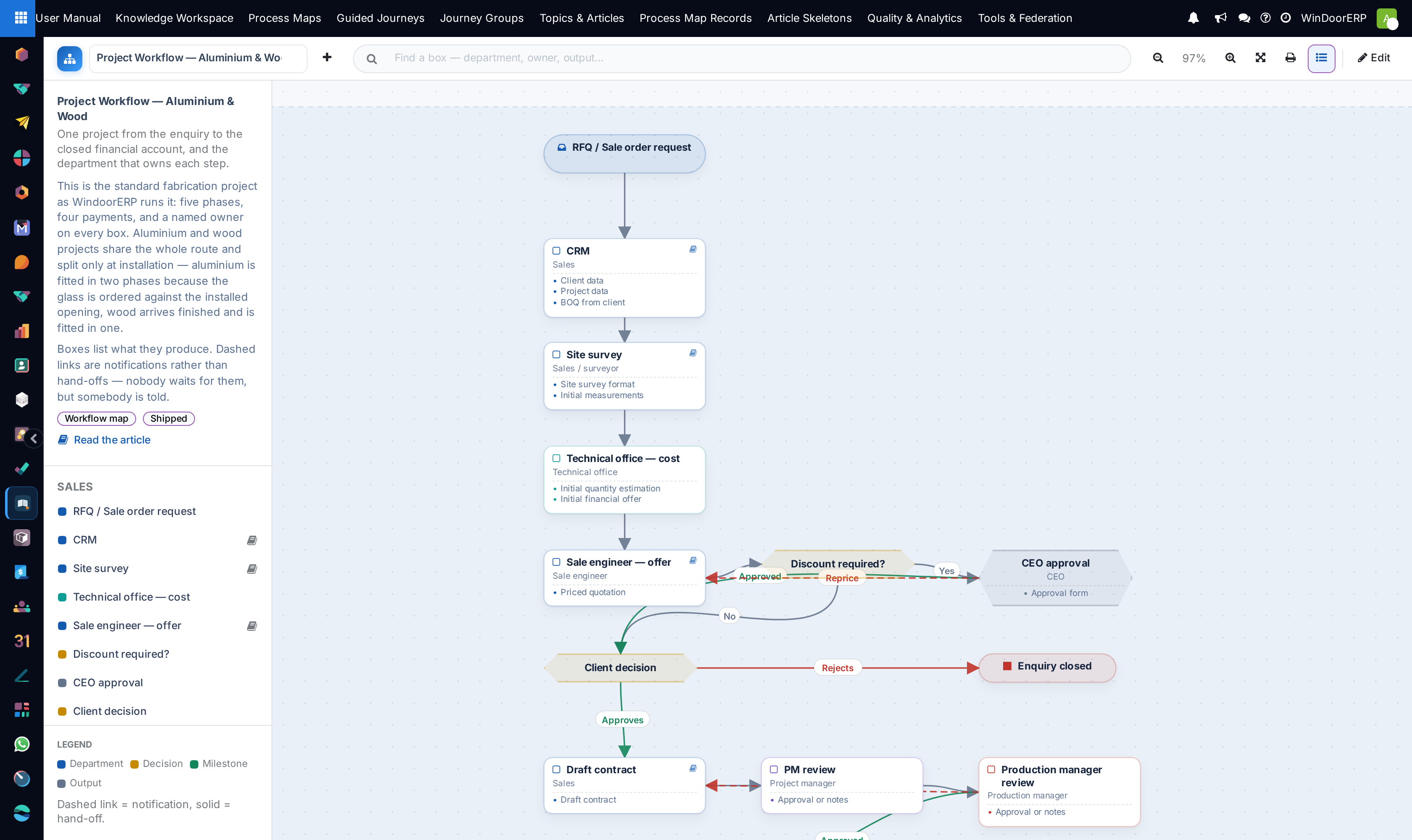
The Project Workflow — Aluminium & Wood map draws the same route as sixty-one boxes and sixty-nine links. Open it in User Manual › Process Maps and read this article beside it; the article says why the route is drawn that way, which is the part you need before you redraw it for your own company.
Before you start
- This is the standard route, not a rule. Where your company genuinely works differently, the map is editable — the article is the thing that has to change with it.
- Read it top to bottom. The canvas runs downwards and opens on the first phase, so a phase you cannot see is below the fold rather than missing.
- The two project types share the whole route and split only at installation. There is one drawing, not two.
Steps
-
01
Go to User Manual › Process Maps and pick Project Workflow — Aluminium & Wood from the dropdown at the top left.
-
02
Start at RFQ / Sale order request at the top — the only start box on the map — and follow the arrows down.
-
03
Read each phase band in turn. The five bands run down the canvas and are named in the rail beside it.
-
04
Stop at every hexagon. Those are the decisions, and each has a path that sends work backwards.
-
05
Click any box carrying a book icon to open the article behind it without leaving the map.
The five phases
Each phase is a band across the canvas, and the same five names group the boxes in the rail. The band is not stored geometry — it is drawn around wherever its boxes happen to sit, so moving a box moves the band with it.
| Phase | What happens in it |
|---|---|
| Sales | The enquiry is captured in CRM, surveyed on site and costed by the technical office; the offer is priced, discounted if the CEO approves, and signed into a contract. |
| Project Management | The project record opens with its schedule, project log and cost log. Final measurements are taken and the technical office issues shop drawings. |
| Production | The plan is launched, stock is checked, what is missing is purchased, and the factory cuts, assembles and inspects. |
| Installation | Units are delivered to site, fitted by the site team under the project manager, and reported on daily. |
| Closing | Final quantities, final offer, final invoice; the project log and the financial account are closed together. |
The four payments
Five green milestone boxes sit on the route. Four of them are the payments, and each is released by a specific event rather than by a date.
| Milestone | What releases it |
|---|---|
| Advance payment | Contract signing. Nothing downstream starts before it lands, and the map draws that as two dashed notifications leaving it — one to the CEO and one to the production manager. |
| Second payment | The client's approval of the drawings and the material samples. |
| Third payment | Delivery to site, notified from the installation box. |
| Final payment | The measured final quantities after installation. |
| Closing | Not a payment. The milestone that shuts the project log and the financial account together. |
Where aluminium and wood differ
The Project type? decision is the only fork between the two, and it sits in the Installation band. Everything before it is identical.
| Type | How it is installed |
|---|---|
| Aluminium | Fitted in two phases. The frames go in first; the technical office then raises the glass purchase request against the installed opening, and glazing follows as a second visit. |
| Wood | Arrives finished and glazed from the factory, so the site work is a single phase. |
How to read the drawing
This map is a workflow, not a mind map, so the shape of a box tells you what kind of step it is. Six kinds appear on it.
| Shape | What it is | On this map |
|---|---|---|
| A rounded pill at the top | Start | One: RFQ / Sale order request. |
| A plain box | Step — work somebody does | Thirty-three, the bulk of the map. |
| A blue box with an owner under the title | Department | Three: Project management, Production, Installation — managed by PM. |
| An amber hexagon | Decision — the route forks here | Eight, listed below. |
| A green box | Milestone | Five: the four payments and Closing. |
| A slate box | Output — a document the step produces | Eight. |
| A red box at the end of a path | End | Two: Enquiry closed and Project closed. A project can finish either way. |
Inside a box, the grey line under the title is the accountable role and the small bulleted list is what the step produces. A book icon in the corner means an article is attached; seventeen of the sixty-one boxes have one, and clicking any of the others does nothing on purpose.
The lines carry the meaning the legend describes, and on this map the legend is right: a solid line is the hand-off, work moving from one owner to the next, and a dashed line is a notification — somebody is told, but nobody waits. Fifty-six of the sixty-nine links are solid and thirteen are dashed. Several links also carry a word: Yes, No, Approved, Rejects, Approves, Reprice, Rework, Notes.
The eight decisions
Every hexagon is a place where the project can go two ways, and the second way costs money or time. These are the boxes worth reading twice.
| Decision | What the two paths do |
|---|---|
| Discount required? (Sales) | Fed from the priced offer. Yes sends it to the CEO; No goes straight to the client. |
| CEO approval (Sales) | The discount gate. Approved carries the offer on to the client; Reprice goes back to the sale engineer as a dashed notification, so nobody is formally waiting on it. |
| Client decision (Sales) | Approves opens the draft contract; Rejects ends the enquiry at Enquiry closed. |
| Client approval (Project Management) | Approval of the shop drawings and the material samples. Approves releases the second payment; Requests changes goes to Client comments, which reworks the technical office. |
| Inventory control (Production) | Whether the material is on hand. In stock goes to the raw-material store; Shortage detours through a purchase request before production can start. |
| CEO approval (Production) | The second one, and a different gate: the purchase order raised for the shortage. Approved releases it to supplier delivery. |
| Project type? (Installation) | Aluminium goes to installation phase 01; Wood goes to a single installation. This is the only fork between the two types on the whole map. |
| TO & CEO approval (Installation) | The gate on the glass purchase request the technical office raises against the installed opening. Approved issues the glass purchase order. |
The hand-offs that go wrong
Four solid links carry more risk than the rest of the map put together, and all four fail the same way — somebody works from a document that has been superseded.
| Hand-off | What goes wrong |
|---|---|
| Survey → technical office | Production builds to the measurements used for pricing instead of the final ones taken after the contract. |
| Technical office → production | A cutting list printed before the last drawing change. It is the most expensive piece of paper in the building. |
| Production → site | Units leave on the truck that was going anyway, rather than against a delivery form and a project. |
| Site → finance | The signed handover is what unlocks the next invoice; without it the money simply waits. |
Important
Every rework loop on the map — Reprice, Notes, Rework from the client's comments, Rework from quality control — returns to the step that owns the decision, not to the beginning. Sending a rejected unit back to sales is how a week disappears.
Troubleshooting
You are looking for a phase and cannot see it. The canvas opens at the first phase and the five bands run downwards. Scroll, or type the box name into Find a box — department, owner, output… at the top and let it centre the canvas for you.
An arrow seems to send work to the wrong place. Check whether it is dashed. A dashed line on this map notifies somebody; it does not move the work.
A box will not open. Only seventeen of the boxes have an article behind them. The rest are steps the manual has not written up, and the click is inert rather than opening an empty page.
The map and this article disagree about a step. The map is data and can be edited here; this article describes the standard route. Where your company genuinely works differently, edit the map rather than arguing with it, and say so in the article the box points at.
The bands are hard to see. They are drawn faintly on purpose, as dashed rounded outlines with the phase name in the corner, so they sit under the boxes rather than competing with them. The rail's grouping is the easier way to tell which phase a box belongs to.
Common mistakes
- Starting production against an unsigned contract or an unpaid advance. The advance is a milestone on the map for that reason.
- Ordering glass before the aluminium frames are installed and the opening is measured.
- Treating a dashed line as a queue and waiting for a reply that nobody owes you.
- Leaving the project log open after the final invoice, so nobody can tell a finished project from a live one.
- Closing an enquiry the client rejected without recording it at Enquiry closed, and losing the reason it was lost.
Was this article helpful?
Thanks — your feedback helps.
Running a window or door factory?
Ask for a demo