Switch between English and Arabic
What this does
Changes the language of your own account. Menus, buttons, field labels, this manual and the layout direction all follow your choice, and Arabic turns the whole interface right-to-left.
It changes nothing for anyone else, and it does not decide what language a customer's quotation is printed in.
Before you start
- The language must already be activated on the database. If it is not in the list, see Add a language for your team.
- Nothing you change here affects other users or any record's data.
Steps
-
01
Click your avatar at the end of the top bar.
-
02
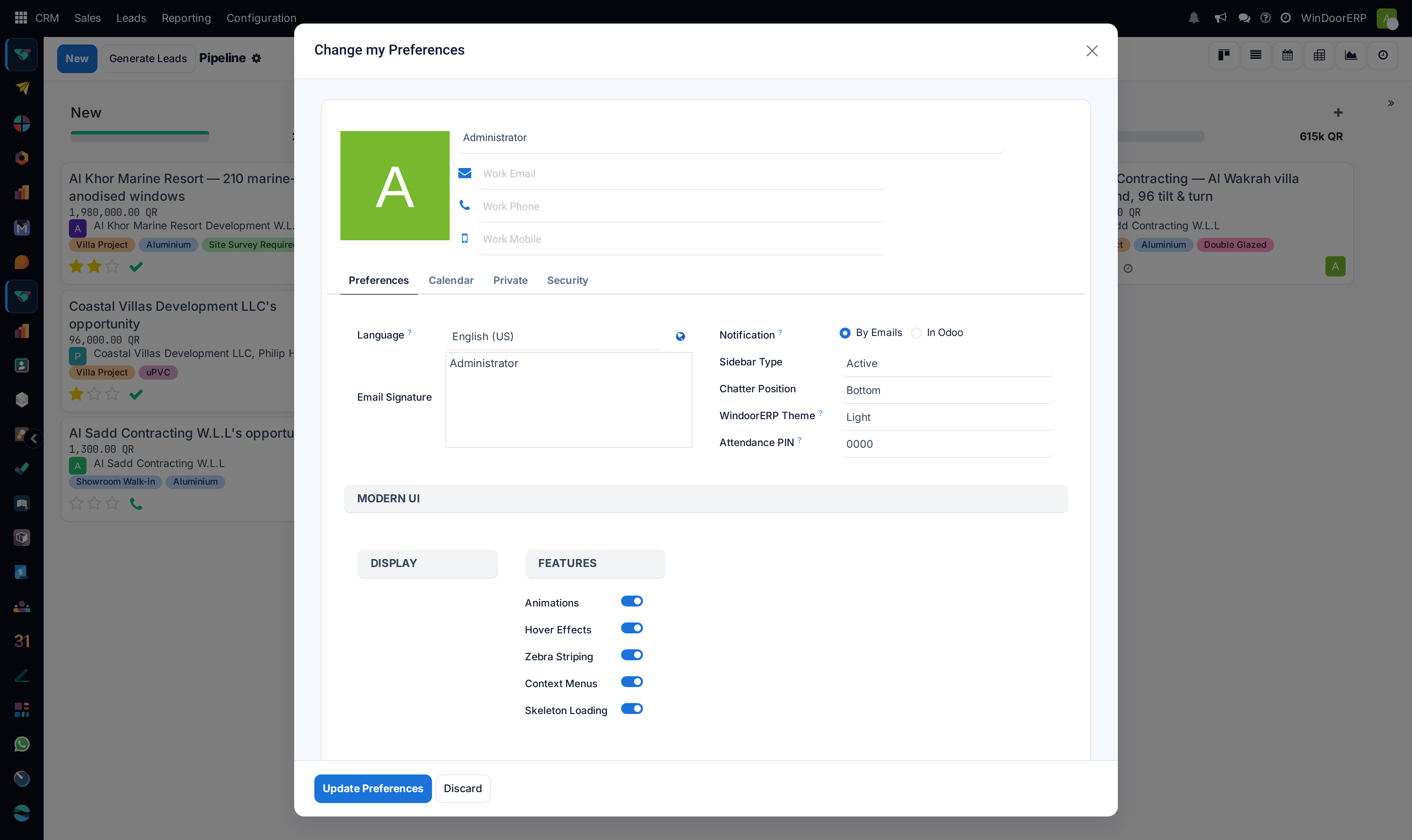
Choose My Preferences. A dialog opens, titled Change my Preferences.
-
03
Stay on the Preferences tab and pick your Language. Only activated languages appear.
-
04
Click Update Preferences.
-
05
Reload the page. The interface follows, and Arabic also mirrors the layout.
Everything on the Preferences tab
| Language | Required. The language of your interface, your printed documents and this manual. Only activated languages are listed. |
|---|---|
| Globe button | Beside the Language field, titled Add a language. It opens the language installer directly. Shown only to system administrators, and only while the dialog is being edited — most users will never see it. |
| Email Signature | Appended to messages you send from the system. Rich text, so a signature block with formatting is fine. |
| Notification | Whether chatter notifications reach you By Emails or only In Odoo. |
| Sidebar Type / Chatter Position / Theme | Interface preferences added by this installation: how the side navigation behaves, whether the chatter sits below or beside the form, and the light or dark skin. |
| Attendance PIN | The code you type at a shared attendance terminal, where that is used. |
| Modern UI toggles | Animations, hover effects, zebra striping, context menus and skeleton loading. Presentation only — turning them off can make a slow machine feel quicker. |
The other tabs
| Calendar | Timezone. Set it, and set it correctly: every date and time you see is converted into it, so a wrong timezone silently shifts deadlines and meeting times. |
|---|---|
| Private | Your own contact details as an employee, where the HR module is in use. |
| Security | Change your password, and the sign-in settings for your account. |
What follows your language, and what does not
| Follows you | Menus, field labels, buttons, selection values, this manual, and the direction of the layout. |
|---|---|
| Follows the customer | Quotations, invoices, delivery notes and outgoing emails are produced in the language set on the customer's contact record, whatever your own is. |
| Follows nobody | Data people typed — product names, descriptions, notes, chatter messages. Those stay in whatever language they were written in, for every reader. |
Some record names can hold only one language at a time. A work centre or a price engine named in English shows in English to an Arabic reader, and that is not a translation fault — it is a single field with one value.
Important
If a customer should receive Arabic documents, set the language on their contact record, not on your own profile. Sending an Arabic-speaking customer an English quotation is a contact setting, never a translation problem.
Troubleshooting
| The language I want is not in the list | It has not been activated on the database. An administrator adds it — see Add a language for your team. |
|---|---|
| The interface is still English after saving | The page was not reloaded. Some labels are cached by the browser until it is. |
| Menus are Arabic but some labels stay English | Those terms have no Arabic translation yet in that module. Report them; they are data, and can be fixed without a new release. |
| The layout did not flip to right-to-left | Only languages whose direction is right-to-left mirror the layout. Check the language's Direction on the Languages screen. |
| A customer got a document in the wrong language | Look at the language on the customer's contact, not at your own preferences. |
| My colleague still sees English | Language is per account. Everyone sets their own. |
| Times are out by hours | The Timezone on the Calendar tab is wrong. It is a separate setting from language. |
Common mistakes
- Changing your own language to make a customer's paperwork Arabic. It has no effect on their documents.
- Saving without reloading, then reporting that the change did nothing.
- Expecting typed data to translate. Only the interface is translated; content is not.
- Leaving the timezone at its default because language was the thing you came to change.
- Treating an English record name in an Arabic interface as a bug. Some fields hold one language only.
Was this article helpful?
Thanks — your feedback helps.
Running a window or door factory?
Ask for a demo