Assemble
Track the work
Why this step
Station by station, so the answer to "where is job 412" is a screen, not a walk.
What this does
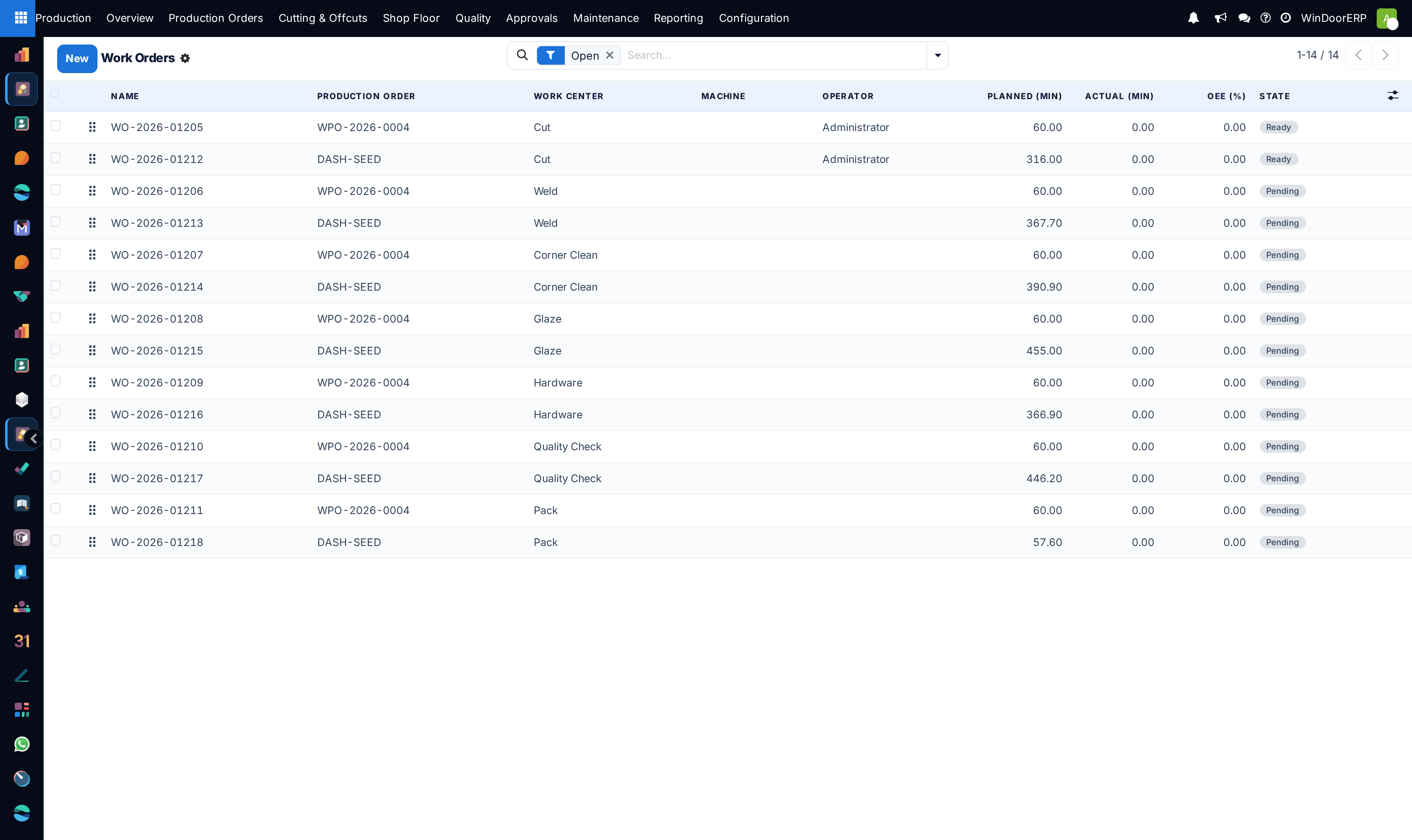
Records what the factory has actually done, so "where is my order?" has an answer that does not require walking the shop. Three backend screens under Production › Shop Floor carry the record: Work Orders — one operation per item and station, driven through its states; Labour Logs — who worked which operation, for how long, with what good and scrap counts, priced for payroll; and the Operator Leaderboard — the all-time totals per operator those logs add up to. The desktop Scan to Advance dialog and the read-only Piece Scans trail complete the picture for serialized pieces.
Most entries here are written by the Shop Floor Terminal as operators work; these screens are where supervisors watch, correct and export.
Before you start
- The Work Orders & Routing feature on, and work orders generated on the production order (Generate Work Orders — it needs a configured production line).
- For piece scanning: the Barcode Scan-to-Advance feature on, so pieces exist and the scan screens appear.
Steps
-
01
Open Production › Shop Floor › Work Orders — the list opens on the Open filter. Watch the states: Pending (predecessors not done) → Ready → In Progress → Done, with Blocked, Awaiting Subcontract and Cancelled on the side.
-
02
Drive an operation from its form when the floor cannot: Mark Ready, Start (sets the machine running, stamps the start), Done (stamps the end and auto-readies the successors), Block / Cancel.
-
03
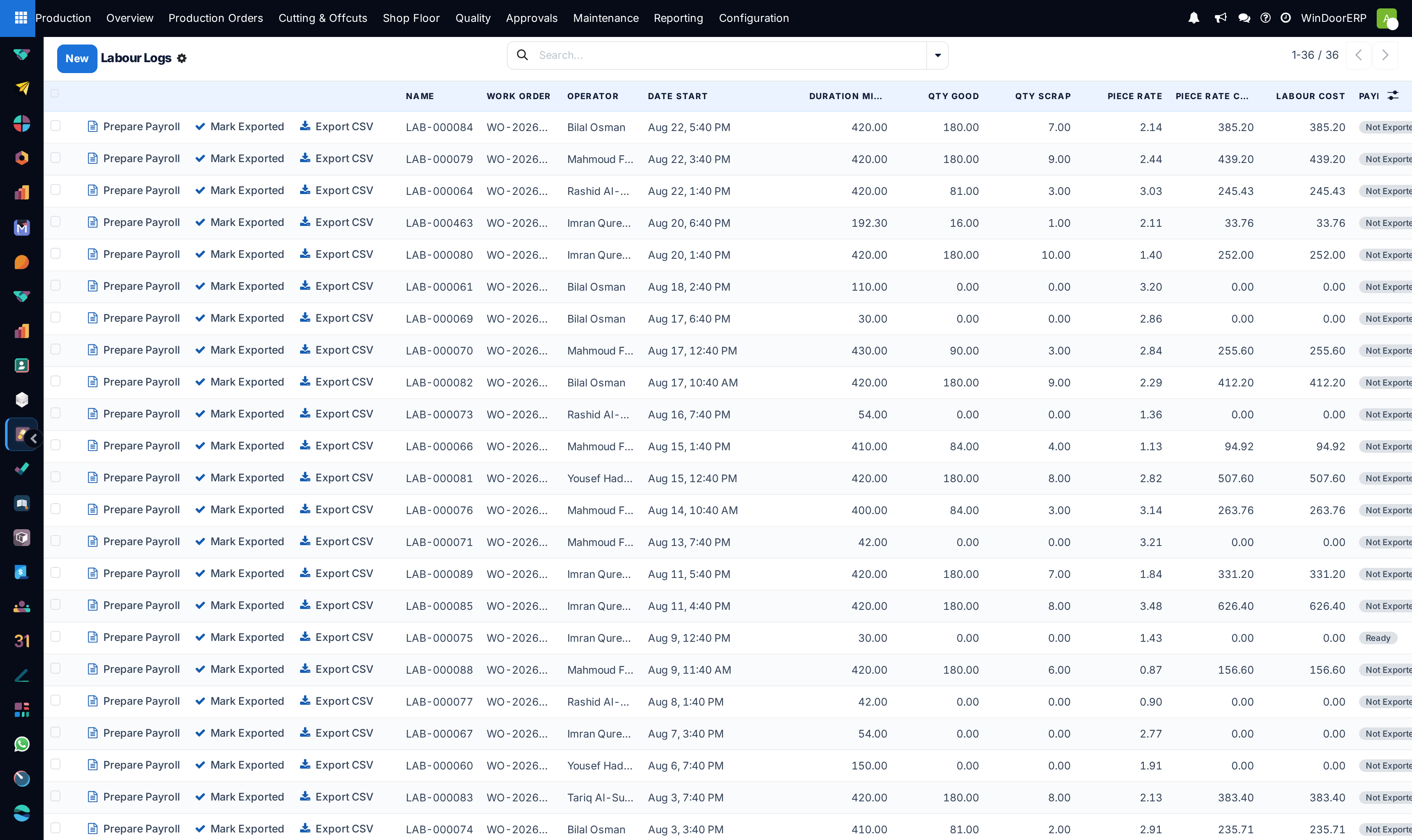
Record time and output as it happens — terminal operators do this implicitly; manual entries go in the work order's Labour Logs tab with duration, Qty Good and Qty Scrap.
-
04
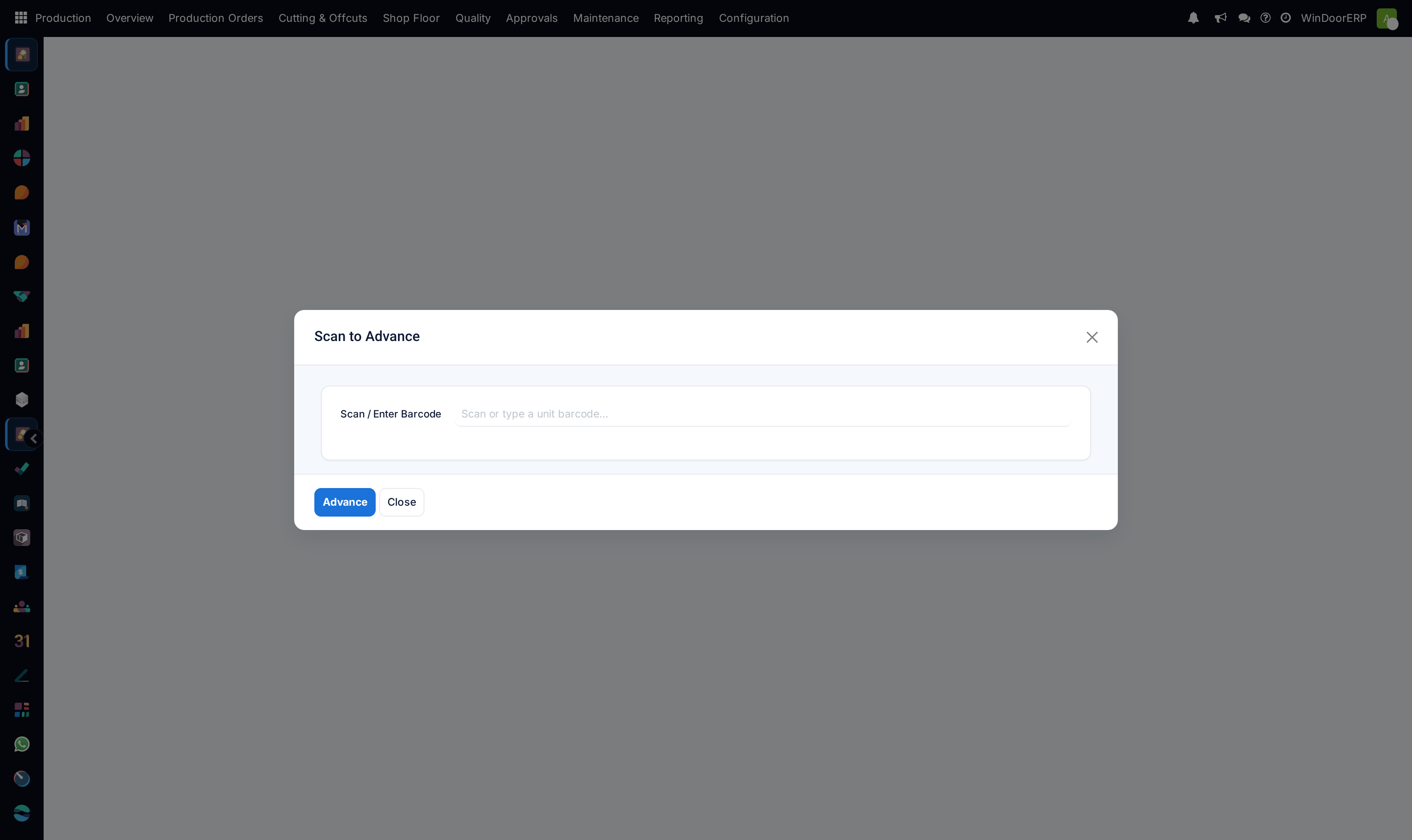
Advance serialized pieces from the desktop with Shop Floor › Scan to Advance: scan a unit barcode (
U-YYYY-######), press Advance, and the piece steps one floor stage; the dialog stays open for the next scan. -
05
Review Labour Logs and export payroll: Prepare Payroll batches the rows, Export CSV produces the file and marks them exported.
-
06
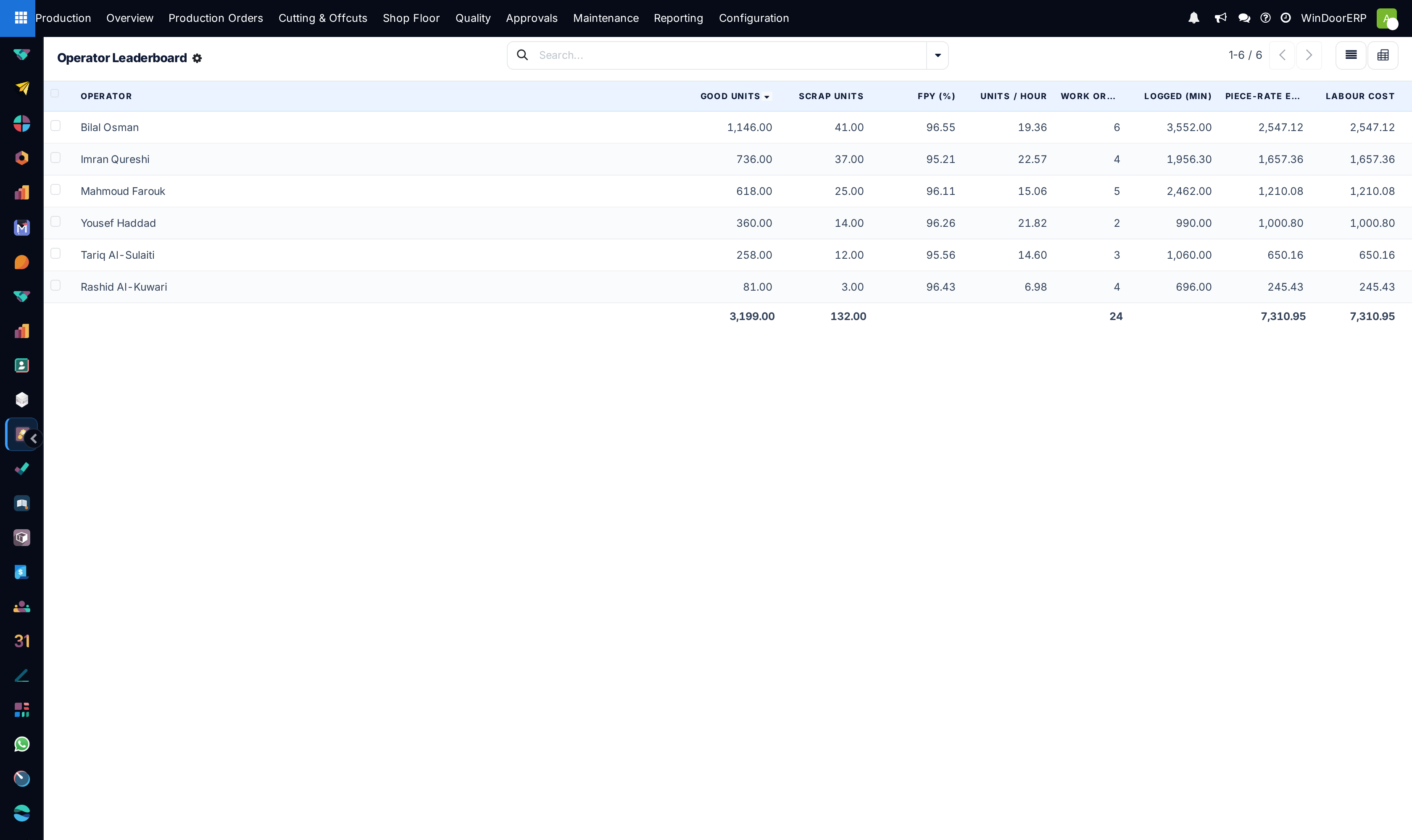
Read the Operator Leaderboard for the long-run picture per operator: good and scrap units, first-pass yield, units per hour, logged minutes, piece-rate earnings and labour cost.
The work order form
| Field | What it does |
|---|---|
| Production Order, Item, Work Center, Machine, Operator | What is being done, where, by whom. The machine list is filtered to the work center's machines. |
| Blocked By | The predecessor operations from the routing graph — what Pending is waiting for. |
| Planned / Setup / Actual (min) | Planned and setup minutes from scheduling; actual is the labour-log total. |
| Qty Good / Qty Scrap, Piece-Rate Cost, Labour Cost | Summed from the labour logs. |
| OEE (%) and its availability / performance / quality parts, Downtime (min) | Computed per operation; downtime is the logged availability-loss minutes. Loss reasons enter only by editing the labour log's Downtime / Loss Reason field or through a maintenance downtime charge — a terminal pause records time but no reason. |
| Subcontracting block | For stations flagged subcontract: the subcontractor, Create Subcontract PO, Send to Subcontractor (state Awaiting Subcontract), quantities sent and returned, and Mark Returned / Partial Return. |
Labour logs and payroll
Each log row prices itself: duration × the work center's Cost per Hour, plus Qty Good × the Piece Rate (defaulted from the work center). The list's per-row buttons are manager-only and enforced server-side: "Only a production manager can export payroll entries." The payroll state runs Not Exported → Ready → Exported; exporting stamps the batch and produces the CSV attachment.
The leaderboard — and the other leaderboard
The backend Operator Leaderboard is an all-time aggregation of labour logs — there is no date filter, deliberately: it answers "who has produced what, ever", with FPY and units/hour as ratios per operator. The kiosk's 🏆 leaderboard is a different measure — today's piece scans, top 20 — so the two disagree by design. An operator who only scans pieces but never runs a labour-logged operation appears on the kiosk board and not here.
Note
The desktop Scan to Advance moves the piece but writes no Piece Scan trail row — only the terminal's scan records who scanned what, when, and the minutes per stage. Where the who/when matters, scan at the terminal. Scans also top out at Packed: receiving into stock and delivering are warehouse steps, and the wizard will still report "… advanced to packed." on a piece that was already packed and did not actually move. With the Scanning feature off, this menu disappears — and the similar scan box on the Production Control overview, whose banner promises "Manual scan entry still works here as a fallback.", then answers "Unknown barcode: …" to every code; the only manual advance that works is the unit form's button.
Troubleshooting
| "Cannot ready …: predecessor operations are not done." | The routing graph is not satisfied. Finish the Blocked By operations first — or correct the graph on the work centers if it is wrong. |
|---|---|
| "Cannot advance …: item … is on quality hold (…). Resolve the NCR/inspection first." | Ready/Start are gated by the item's quality state while the QC feature is on. Completion (Done) is not gated. |
| "Only a production manager can export payroll entries." | The payroll buttons are manager-only, and the check is in the method — hiding the buttons is not the only protection. |
| "Labour log … is already exported. Only reset it through a controlled payroll correction." | Exported rows are locked against re-batching. |
| "Unknown barcode: …" in Scan to Advance | The code is not a produced-unit serial — or the Scanning feature is off, in which case every scan answers this. |
| An operator is missing from the backend leaderboard | Rows exist only for operators with at least one labour log. Piece scans alone feed the kiosk board, not this one. |
Common mistakes
- Batch-closing a week's operations on Thursday — every progress report, OEE figure and labour cost then describes fiction.
- Recording scrap by quietly consuming more material instead of logging Qty Scrap — the breakage rate is only visible if it is recorded.
- Reading the kiosk leaderboard and this one as the same number — today's scans versus all-time labour logs.
- Using desktop Scan to Advance for everything and losing the per-stage time trail the terminal would have recorded.
- Marking an operation Done to clear a quality hold — Done is not gated, but the hold stays on the item and stops the next station instead.
Checkpoint
You can see which station the order is sitting at, and who last touched it.