Account for scrapped goods
What this does
Explains where the value of scrapped material goes on this platform. The scrap workflow itself — raising and validating scrap orders — is covered in the counting-and-scrap article; this one covers the accounting: what a validated scrap does to your books today (less than most people assume), and what the Loss Account machinery would do if accounting ever switches it on.
The honest headline first: with this platform's periodic valuation, validating a scrap posts no journal entry. The stock quantity drops, the Stock report's Total Value drops with it, and accounting sees the effect at closing time — as a lower ending stock, not as a labelled scrap expense.
Before you start
- Nothing to configure for the current behaviour — scraps land in the Inventory adjustment loss location and reduce stock, full stop.
- To ever see scrap as a labelled expense line, two accounting decisions are needed: perpetual valuation on the affected categories, and a Loss Account on the scrap destination location. Neither is set anywhere on this platform today.
Steps
-
01
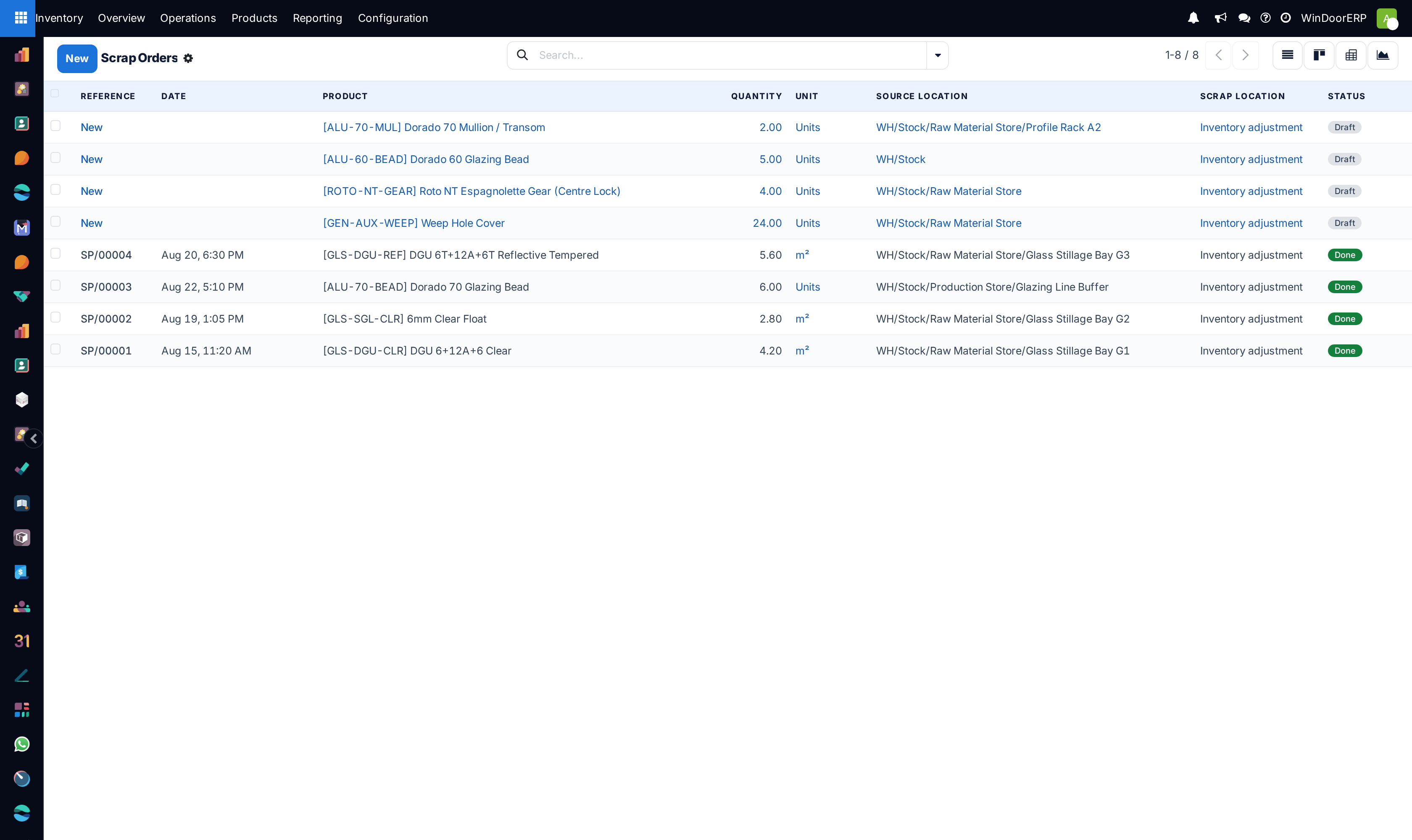
Scrap as usual (or let production's quality dispositions raise the scrap orders — they arrive here in Draft for the warehouse to validate).
-
02
Validate the scrap: quantity leaves the source location for the loss location, and the product's on-hand and value fall accordingly.
-
03
Measure breakage where it is visible now: Inventory › Reporting › Moves History paints scrap references red, and its Inventory Adjustments filter isolates that traffic — or read the scrap orders themselves under Operations › Adjustments › Scrap. (Filtering by the loss location needs the multi-locations right, which few users hold.)
-
04
For a money figure, do the arithmetic the system does: scrapped quantity × the product's Cost (everything here is standard-costed, so the multiplication is honest).
-
05
At period end, accounting closes the stock valuation; the scrapped value is inside the period's stock variation.
The Loss Account machinery, honestly
| Element | State on this platform |
|---|---|
| Loss Account on the destination location | The field exists on every inventory-loss location's form (its help: an expense account used to re-qualify products removed from stock) — and is empty on every loss location here. |
| Journal entry on scrap | Would require Perpetual (at invoicing) valuation on the category and the Loss Account set; then validation would credit the stock account and debit the loss account immediately. With periodic valuation — this platform — nothing posts regardless. |
| The closing report's "Inventory Loss" line | The accountants' closing view can break out inventory-loss movements as their own line — but only when a loss location carries an account, so it is absent here. |
| A "scrapped value" report | Does not exist on this install. Quantity trails exist (Moves History, the scrap orders themselves); money is quantity × Cost, computed by you. |
Note
You do not need to create a scrap location for any of this. Your company ships a single inventory-loss location — Inventory adjustment — and scrap defaults to it (other companies on the platform also carry a separate Scrap location; either way the default is the company's first loss location). Adding more loss locations is an organisational choice — separating shrinkage from breakage in the move history — not an accounting requirement.
Troubleshooting
| No journal entry after validating a scrap | Expected — periodic valuation posts nothing per move. The books catch up at closing. |
|---|---|
| Scrap doesn't appear in the Profit and Loss | Same reason. Until perpetual valuation plus a Loss Account exist, scrap is not a labelled P&L line — it is part of the closing stock variation. |
| Where did the scrapped stock go? | Into the company's inventory-loss location. Seeing the quants there needs the multi-locations right (Locations report with the Internal Locations filter cleared); without it, read the scrap orders and Moves History's red-referenced rows instead. |
| Draft scrap orders keep appearing on their own | Production quality dispositions (scrap / full remake) raise them automatically for the affected serials; the warehouse validates or cancels them. |
| Can we at least see scrap trends? | Yes — Moves History with the Inventory Adjustments filter (or the red-referenced rows), grouped by product and month in the pivot. Quantities only; multiply by Cost for value. |
Common mistakes
- Setting up a Loss Account and expecting entries to start — under periodic valuation the account is inert; the valuation mode is the real switch, and it belongs to accounting.
- Quietly consuming extra material instead of scrapping. Scrap is the only trail that makes breakage measurable — the production articles make the same point from the floor's side.
- Reading the missing P&L line as lost data. The value is in the books — inside the closing stock variation — just not labelled "scrap".
- Building a scrap-cost report off delivered prices instead of Cost — stock leaves at cost, not at sales price.
Was this article helpful?
Thanks — your feedback helps.
Running a window or door factory?
Ask for a demo