Choose a costing method
What this does
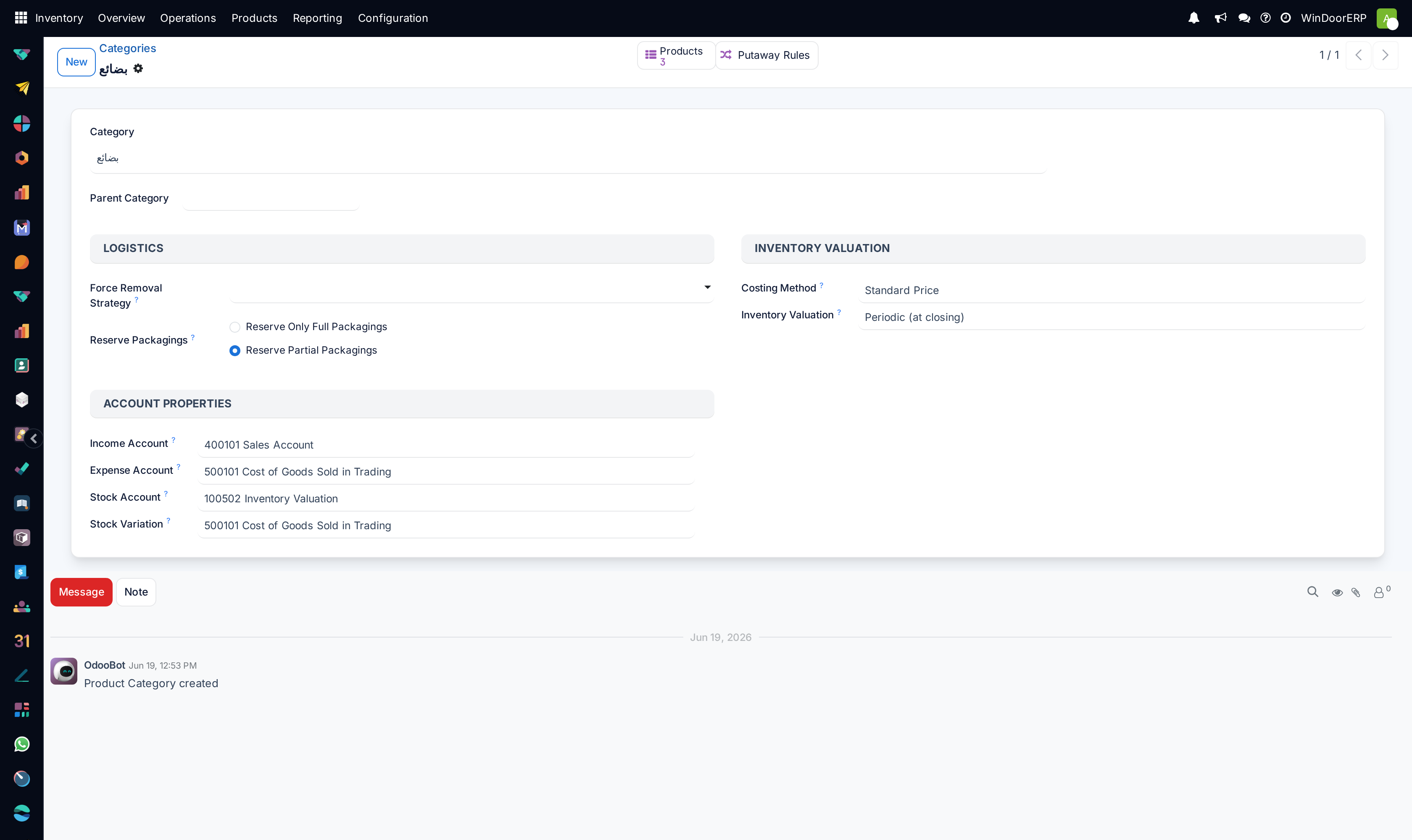
The costing method decides what a unit is worth when it enters and leaves stock — and therefore what your inventory is worth. In WindoorERP 19 it is set in exactly one place: the product category, in its Inventory Valuation block. There is no costing switch in the Settings screens; every category carries its own Costing Method and, next to it, the Inventory Valuation mode that decides when accounting entries happen.
On this platform every category runs Standard Price costing with Periodic (at closing) valuation — the defaults. That combination means day-to-day stock moves never post journal entries; accounting values the inventory at closing time. This article explains the three costing methods so you can choose deliberately, and what actually happens if you change one.
Before you start
- Inventory's Configuration menu is manager-only, so from this app only a stock manager reaches a category form (Accounting, Sales and Purchase have their own Configuration entries). The Costing Method field itself carries no group gate; the Inventory Valuation selection shows for stock managers or accounting-read users, and the Account Properties block only for accounting users.
- Talk to accounting first. The method is a bookkeeping policy, not a warehouse preference — and changing it recomputes product costs immediately, with no confirmation step.
Steps
-
01
Open Inventory › Configuration › Products › Product Categories and pick the category.
-
02
Read the Inventory Valuation block: Costing Method — Standard Price, First In First Out (FIFO) or Average Cost (AVCO) — and Inventory Valuation — Periodic (at closing) or Perpetual (at invoicing).
-
03
Check the Account Properties beneath (visible to accounting users): the Income and Expense accounts, the Stock Account that would hold inventory value, and the Stock Variation counterpart.
-
04
For Standard Price products, maintain the Cost field on each product — receipts never update it; you do, as vendor contracts change.
-
05
If you change the costing method, do it knowingly: saving the category immediately recomputes the cost of every product in it, silently — no wizard, no confirmation.
The three methods, worked through
Standard Price
A fixed unit cost you maintain by hand. Receipts at any purchase price value the stock at the standard, and the difference stays in the purchase expense.
| Operation | Unit Cost | Qty On Hand | Delta Value | Inventory Value |
|---|---|---|---|---|
| Initial stock | 10 | 0 | — | 0 |
| Receive 8 @ 10 | 10 | 8 | +8 × 10 | 80 |
| Receive 4 @ 16 | 10 | 12 | +4 × 10 | 120 |
| Deliver 10 | 10 | 2 | −10 × 10 | 20 |
| Receive 2 @ 9 | 10 | 4 | +2 × 10 | 40 |
Average Cost (AVCO)
The unit cost is the weighted average, recomputed on every receipt; deliveries leave at the current average.
| Operation | Unit Cost | Qty On Hand | Delta Value | Inventory Value |
|---|---|---|---|---|
| Initial stock | 0 | 0 | — | 0 |
| Receive 8 @ 10 | 10.00 | 8 | +8 × 10 | 80 |
| Receive 4 @ 16 | 12.00 | 12 | +4 × 16 | 144 |
| Deliver 10 | 12.00 | 2 | −10 × 12 | 24 |
| Receive 2 @ 9 | 10.50 | 4 | +2 × 9 | 42 |
First In First Out (FIFO)
Each delivery consumes the oldest remaining receipts at their own prices; the product's Cost follows what actually left.
| Operation | Unit Cost | Qty On Hand | Delta Value | Inventory Value |
|---|---|---|---|---|
| Initial stock | 0 | 0 | — | 0 |
| Receive 8 @ 10 | 10.00 | 8 | +8 × 10 | 80 |
| Receive 4 @ 16 | 12.00 | 12 | +4 × 16 | 144 |
| Deliver 10 (8 @ 10 + 2 @ 16) | 16.00 | 2 | −112 | 32 |
| Receive 2 @ 9 | 12.50 | 4 | +2 × 9 | 50 |
How WindoorERP 19 records value
- There is no separate "valuation layer" ledger. Each stock move carries its own Value, set at validation from the best available source: a manual adjustment first, then the posted vendor bill amount, then the purchase-order price, then the product Cost. Current value and average cost are computed live from those moves.
- Editing a product's Cost writes a history row — "Price update from … to … by …" — which you read in Reporting › Stock by clicking a product's Unit Cost, opening its Unit Cost History. (FIFO products are the exception: their cost follows the moves, and a manual edit logs nothing.)
- Separately, a stock manager can correct one move's value from the ⚙ Actions menu on a stock move — the Adjust Valuation dialog, strictly one at a time: "You can only adjust valuation for one move at a time."
- Periodic (at closing) means no journal entry is posted by any receipt, delivery, scrap or adjustment. Accounting books the stock variation at closing; a closing report exists for accountants, without a menu on this build.
- Perpetual (at invoicing) would post entries automatically as goods are billed or invoiced — the mode this platform does not use. The Price Difference Account field only ever appears in that mode, which is why you will not find it here.
Important
Changing the costing method is immediate and silent. Saving the category recomputes every one of its products' costs on the spot — there is no confirmation dialog and no undo. Agree the cut-over date with accounting, and expect the Stock report's Total Value to move at that moment.
Troubleshooting
| There is no costing option in Inventory Settings | Correct — the only Settings block is Valuation (the Landed Costs enabler). Costing and valuation live on each product category. |
|---|---|
| The Inventory Valuation selection is missing on the category | It shows only for stock managers or users with accounting read access. The Costing Method beside it is visible to anyone who can open the form. |
| Receipts at new prices never change the product Cost | That is Standard Price working as designed. Switch the category to AVCO or FIFO if cost should follow purchases. |
| No journal entries appear for stock moves | Periodic valuation — entries happen at closing, not per move. Nothing is wrong. |
| The Cost column on the product list cannot be edited | It is read-only in the list on purpose; open the product form to change Cost (each change is history-logged, except on FIFO products). |
| A move's Value does not equal quantity × Cost | Expected. On-hand valuation uses the product Cost, while each move's value takes the best source available — a manual adjustment, then the posted vendor bill, then the purchase-order price, then the standard cost. The two figures answer different questions. |
| "You cannot enable lot valuation because the following products have on-hand quantities without a lot/serial number: …" | The guard on per-lot valuation — assign lots to existing stock first. (On this platform the lots interface is not enabled anyway; see the lot-valuation article.) |
Common mistakes
- Hunting for a "Periodic / Perpetual" switch in Settings — it does not exist; the choice is per category, and the wording is Periodic (at closing) / Perpetual (at invoicing).
- Changing a category's method mid-month "to see what happens" — the recompute is instant, silent and company-wide for that category.
- Forgetting the standard costs. Under Standard Price the valuation is only as honest as the Cost fields someone maintains.
- Reading the Stock report's Total Value as an accounting figure. Under periodic valuation the ledger catches up at closing; between closings the report is the operational truth, not the booked one.
- Mixing methods across categories without telling accounting — each category's products value differently, and margin comparisons across them mislead.
Was this article helpful?
Thanks — your feedback helps.
Running a window or door factory?
Ask for a demo