Generate a cutting list
What this does
Produces the list the saw works from. It is built in two layers on the production order's Material tab: the material list — every profile piece, reinforcement, glass panel and hardware item the analyses call for, with cut-to-cut lengths and angles per piece — and the cutting plans, which arrange those pieces onto physical bars. The paperwork the floor receives (profile cut list, reinforcement cut list, wastage summary) prints from these.
Before you start
- Every item on the production order carries a current design analysis — the list is generated from the analysis, not from the drawing.
- Bar-cutting products need Optimize Bar Cutting enabled on the product — unflagged products are simply skipped — and every flagged product needs a valid Standard Bar Length (default 5900 mm), because one flagged product without it aborts the whole optimization run.
Steps
-
01
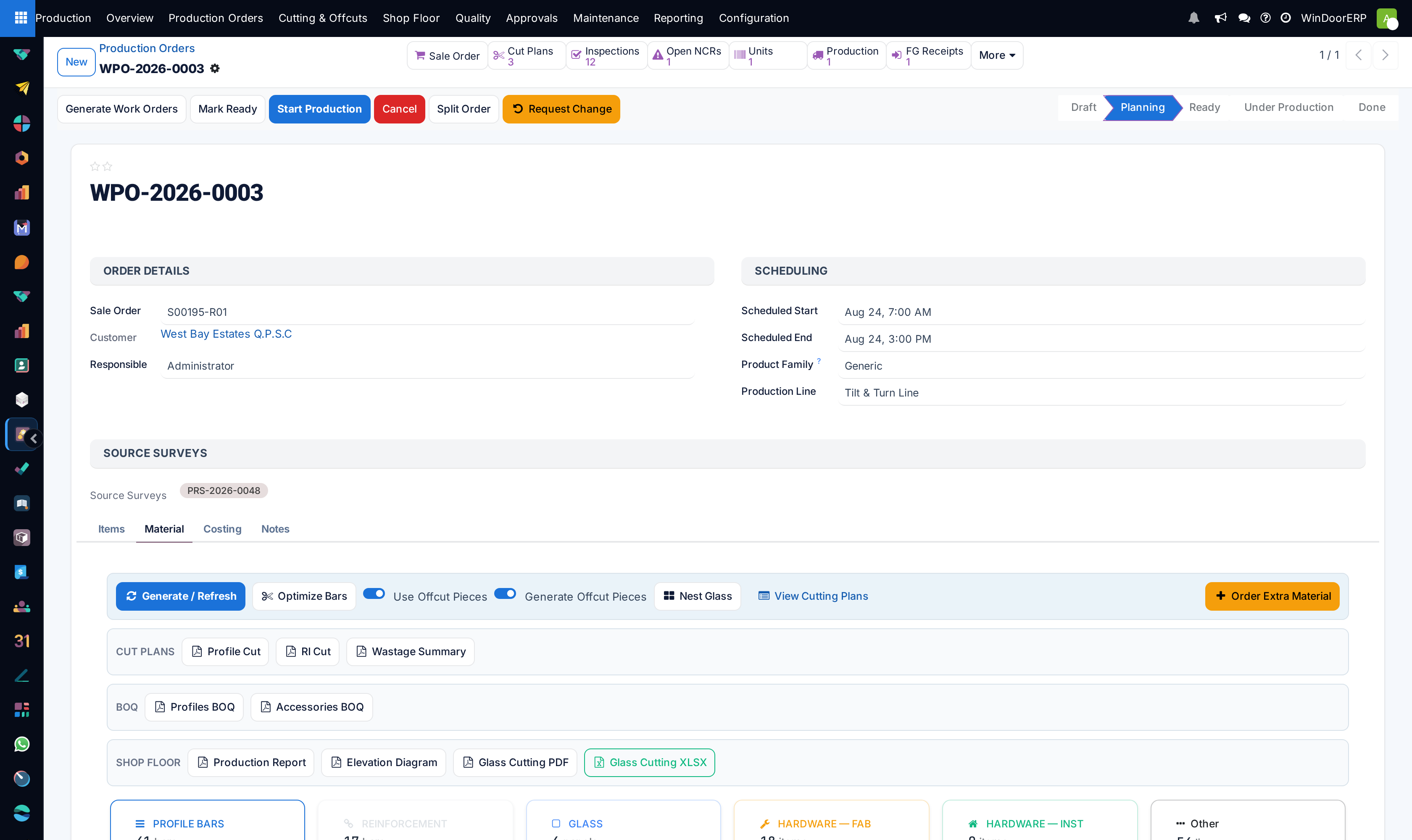
Open the production order's Material tab and press Generate / Refresh. Confirm the dialog — it warns that the current lines, including manual edits, are discarded and rebuilt from each item's analysis.
-
02
Check the six summary cards (profile bars, reinforcement, glass, fabrication and installation hardware, other) and the per-category pages beneath them.
-
03
Read the profile lines: Cut-to-Cut (mm) is the finished piece length, Cut Angles distinguishes mitre from square cuts, and Source Label (for example
C1-W) ties each piece back to its opening and orientation. -
04
Press Optimize Bars (or simply Confirm the order, which runs it for you when no plans exist) to nest the pieces onto bars — one cutting plan per profile product.
-
05
Print for the floor from the Material tab's report buttons: the Profile Cut and RI Cut lists, the Wastage Summary, the BOQ reports, and the Glass Cutting PDF or XLSX.
-
06
Issue the paperwork together with the piece labels, so every stick can be identified after it leaves the saw.
Reading the material list
| Column | What it means |
|---|---|
| Category / Type | Profile Bars, Reinforcement, Glass, Hardware — Fabrication, Hardware — Installation, Other; the type refines it (frame, sash, bead, mullion…). Installation hardware ships on its own transfer, separate from the factory's. |
| Parent (Combo), Combo Depth | Kit products from the analysis are exploded into child lines, up to five levels deep — a truncated kit posts "Combo explosion stopped at the maximum depth of 5 levels; deeper kit contents were not expanded for: …" in the chatter. |
| Qty | A piece count: pieces per unit × the item quantity. Drawings holding several frames in one geometry are not double-issued. |
| Length (mm) / Cut-to-Cut (mm) | The overall and the finished cut length. The saw cuts the cut-to-cut figure — it already accounts for the joint, and it is not the drawing dimension. |
| Cut Angles | The two end angles. Getting a mitre wrong wastes the profile, not just the time. |
| Source Label, Position, Orientation | Which opening the piece belongs to, its side (top/bottom/left/right) and direction (width/height). |
The cutting plan
Each plan (also reachable under Production › Cutting & Offcuts › Cutting Plans) is one product on one order: the inputs it was computed with — stock length, saw kerf, end trim, reusable threshold, the optimizer strategy — and the results: bars used, pieces, used and rest millimetres, the waste percentages and the Yield %. The Bars tab lists one row per cutting pattern with Bars (×) for how many identical bars follow it, which bars are nested on offcuts from stock, and each bar's rest flagged Reusable or Waste.
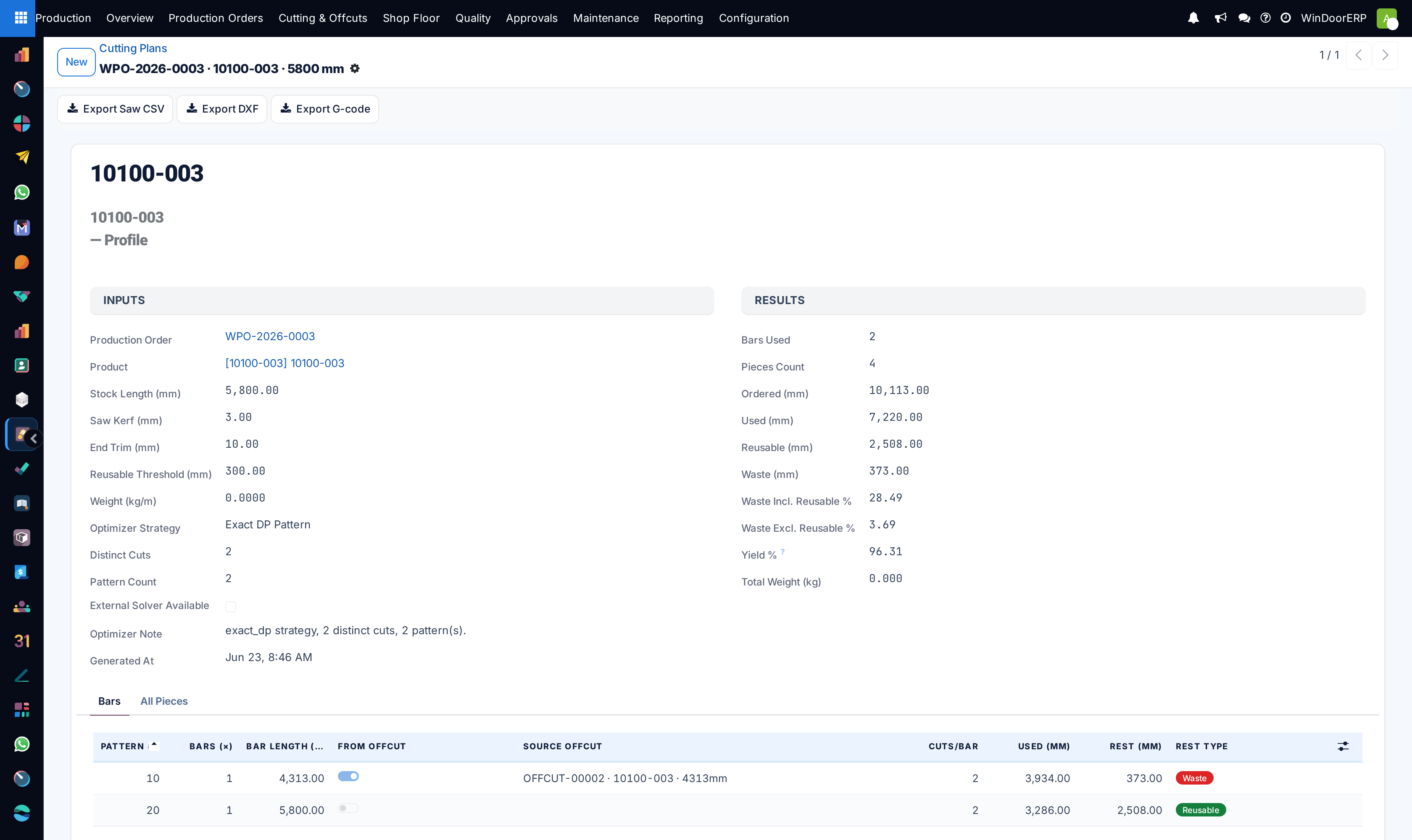
Plans carry no state and no confirm button — Optimize Bars wipes and rebuilds them wholesale, so treat a printed plan as a snapshot of the moment it was printed. Note that the production transfer created at Confirm requests profiles as the plan's whole fresh bars, not as cut pieces — which is why transfer quantities differ from the material list.
The Export Saw CSV button on a plan produces a file with one row per distinct cut of each pattern — without the cuts-per-bar or bars-per-pattern quantities, so cross-check counts against the Bars tab before feeding a controller. The DXF and G-code exports are placeholder formats in this release.
Important
The cutting list is generated from the analysis. If a design was edited and not re-analysed — or the change request was approved but nobody pressed Generate / Refresh — the list describes the previous revision, and the saw will believe it.
Troubleshooting
| "Material list generated (… lines). … item(s) have no design analysis yet: …" | Those items produced no material. Analyse their designs and regenerate. |
|---|---|
| "No material lines eligible for optimization. Enable 'Optimize Bar Cutting' on at least one profile or reinforcement product, and regenerate the material list first." | Optimize Bars found nothing to nest — the flag lives on the product template. |
| "Product … has optimization enabled but no valid Standard Bar Length." | Set the bar length on the product; without it no plan can be computed. |
| "… already has committed warehouse activity (…). Rebuilding the material list / cutting plans would invalidate those stock documents. …" | The order's transfers are already issued or its offcuts consumed. Cancel the transfers first if the rebuild is genuinely intended. |
| The "All Pieces" tab on a plan shows patterns, not pieces | A known display quirk — the per-piece detail lives inside each bar row on the Bars tab. |
| A profile product is missing from the production transfer | If its whole demand was served from offcut stock, nothing fresh is issued — the transfer simply omits it. |
Common mistakes
- Cutting from a list printed before the last design change or the last Optimize Bars run.
- Reading a drawing dimension as a cut length — the saw cuts Cut-to-Cut.
- Hand-editing material lines and then pressing Generate / Refresh, which discards every manual edit after one confirmation dialog.
- Cutting without labels, then owning a pile of aluminium nobody can allocate to a window.
- Substituting bars on the floor — following the piece lengths but not the pattern changes which rests come off which bars, and the booked offcuts no longer match reality.
Was this article helpful?
Thanks — your feedback helps.
Running a window or door factory?
Ask for a demo