Invoice a project progressively
What this does
Bills a project in stages against what has actually been completed, instead of invoicing the whole contract at the end — the way fabrication and installation contracts are normally paid.
See also
This article covers the sales-order side: how a claim is raised and what it does to the order. The invoice itself is documented in Bill contract progress with a BOQ invoice, with Take a contract advance through a BOQ invoice for advances and Ways to create customer invoices for choosing between the methods.
Before you start
- The order must be confirmed, with the lines that will be billed progressively already on it.
- Agree with the customer what "progress" means for this contract: a percentage of each line, or a quantity completed.
- Claims are raised from the main contract. A variation order is billed through its parent, never on its own.
Steps
-
01
Open the confirmed sales order.
-
02
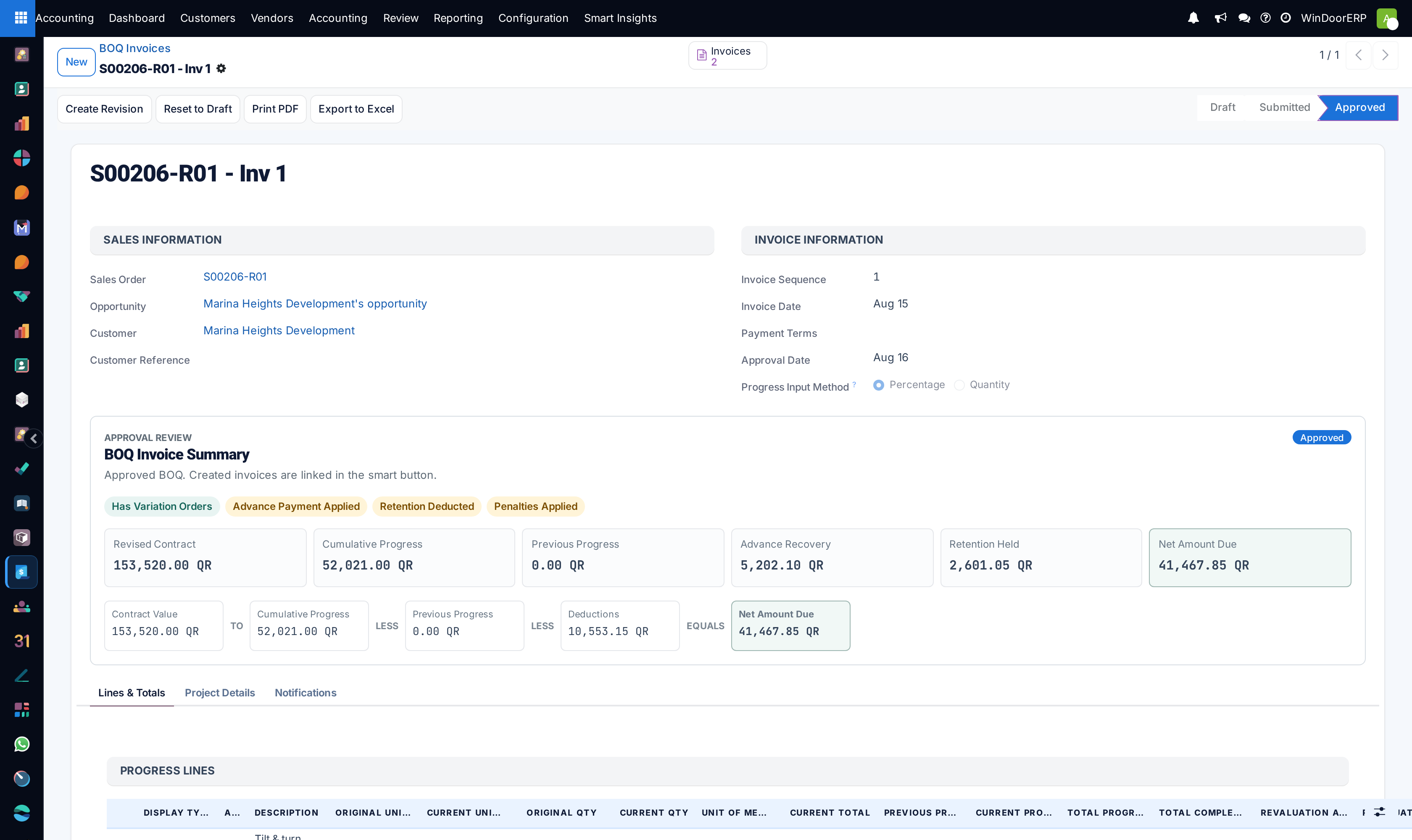
Click Create Invoice using BOQ. WindoorERP creates the next claim in the sequence, with a section per order — the main contract and each variation — and a progress line for every order line.
-
03
Choose the Progress Input Method: Percentage to enter a completion percentage per line, or Quantity to enter the quantity done.
-
04
Enter this period's cumulative position per line.
-
05
Check the summary: cumulative progress, less previous progress, less the deductions, equals the amount due.
-
06
Submit the claim, then approve it. Approval creates and posts the customer invoice automatically.
How the cumulative model works
Each claim states the cumulative position of the job, not the increment. The system deducts what was certified before and bills the difference. That is what keeps a long project's invoices adding up to the contract value, no matter how the percentages moved along the way.
Example
A curtain-wall package is 30% complete at the end of month one and billed accordingly. At the end of month two the site is 55% complete: the second claim is entered as 55%, and the invoice is raised for the 25% difference — not for 55% again.
What the order tracks for you
| On the order | What it tells you |
|---|---|
| BOQ Invoices smart button | Every claim raised against this contract, in sequence. |
| Variations smart button | Variation orders linked to this contract; they are billed through it. |
| Retention Releases smart button | Retention released so far, with the balance still held. |
| BOQ Inv Options tab | The contract parties, retention settings, project totals, and whether advances count as completed progress. |
Advances and retention
- An advance taken at the start is recovered against later claims rather than sitting as a credit nobody reconciles. Raise it with Advance Payment using BOQ, from the main contract only.
- Retention is withheld per claim and released later through Release Retention, so the amount held is always visible on the job.
Warning
Do not raise ordinary invoices on a job that is being billed progressively. The two methods keep separate ideas of what has been billed, and reconciling them afterwards is manual work.
Troubleshooting
| Symptom | Cause and fix |
|---|---|
| "Cannot create BOQ Invoice from a variation order. Please create the invoice from the main contract." | You are on a variation. Open its parent contract; the claim covers the variations as their own sections. |
| Progress over 100% is refused | The cumulative figure for that line exceeds the contract quantity — the message names the line and the total it would reach. Remember the entry is cumulative, not this period's increment. |
| "No retention balance available to release." | Nothing is held yet, or it has all been released. The BOQ Inv Options tab shows held, released and balance. |
| Deductions exceed what was billed this period | The invoice would be negative. Reduce the deductions, or spread the recoupment across more claims. |
| The invoice appeared without anyone creating it | Correct — approving the claim creates and posts it. Look under the claim's Invoices smart button. |
Common mistakes
- Entering the increment instead of the cumulative figure, and under-billing the job by everything already certified.
- Trying to bill a variation order directly instead of through the main contract.
- Invoicing progress that the site has not signed for.
- Forgetting the retention release at the end of the defects period — it is money the company is owed.
Was this article helpful?
Thanks — your feedback helps.
Running a window or door factory?
Ask for a demo