Run one order through the factory
Optimise the cut and see the waste
Why this step
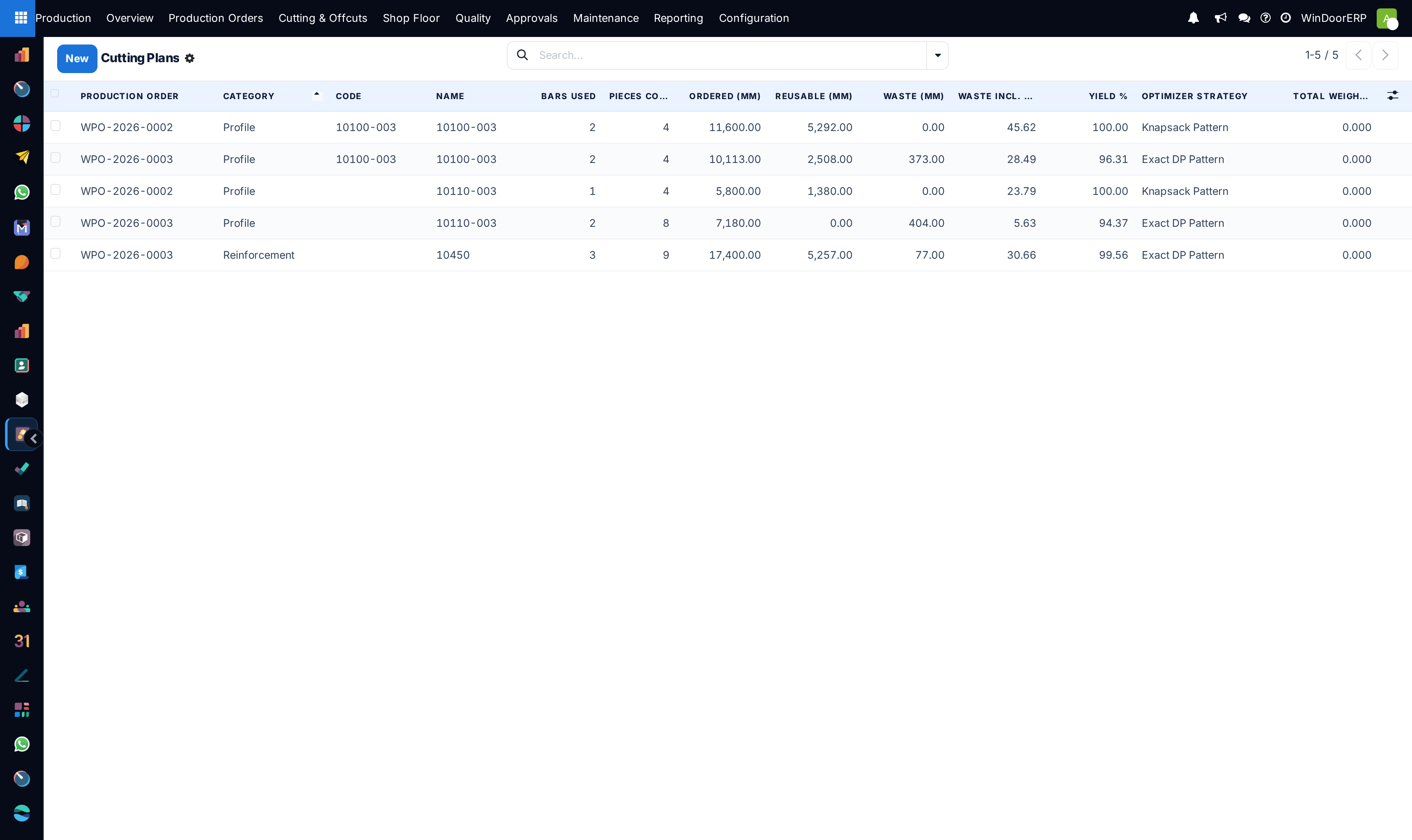
Nesting the cuts across full-length bars is where the margin on a job is won or lost. Run the optimisation and look at the offcut percentage — that number is your setup, marked.
What this does
Optimize Bars arranges the required profile and reinforcement pieces along stock bars so that as little metal as possible ends up as scrap — on an aluminium job, usually the biggest single saving available. It also runs the offcut economy: usable remnants are recorded in the Offcut Inventory, and the next optimization draws on them before opening fresh bars. Glass has its own nesting (Nest Glass) that packs rectangular panels onto sheets.
The optimizer runs from the production order's Material tab, and automatically on Confirm when no plans exist yet. Very large orders are queued and processed in the background — usually starting within moments; a ten-minute scheduled job is the fallback safety net.
Before you start
- Real stock lengths. Each bar product's Standard Bar Length is what its plan is computed against — optimising against 5.9 m when the rack holds 6.5 m throws away the difference on every bar.
- The factory-wide inputs reviewed in Production › Configuration › Settings: Saw Kerf (mm) (default 3), End Trim (mm) (default 10, charged at both bar ends), Reusable Rest Threshold (mm) (default 300 — a product can override it).
- The two toggles on the order itself: Use Offcut Pieces (draw on offcut stock first) and Generate Offcut Pieces (book reusable rests into the inventory).
Steps
-
01
On the order's Material tab, press Optimize Bars and confirm — the dialog warns that all cutting plans are regenerated and this order's offcut reservations are released and rebuilt.
-
02
Read the result toast and chatter: plans generated, bars used, offcuts reserved from stock, new offcuts produced, and any products skipped because optimization is disabled on them.
-
03
Open a plan and judge the Yield % and the waste split — Waste Excl. Reusable is the true loss; rests above the threshold return to stock as offcuts rather than scrap.
-
04
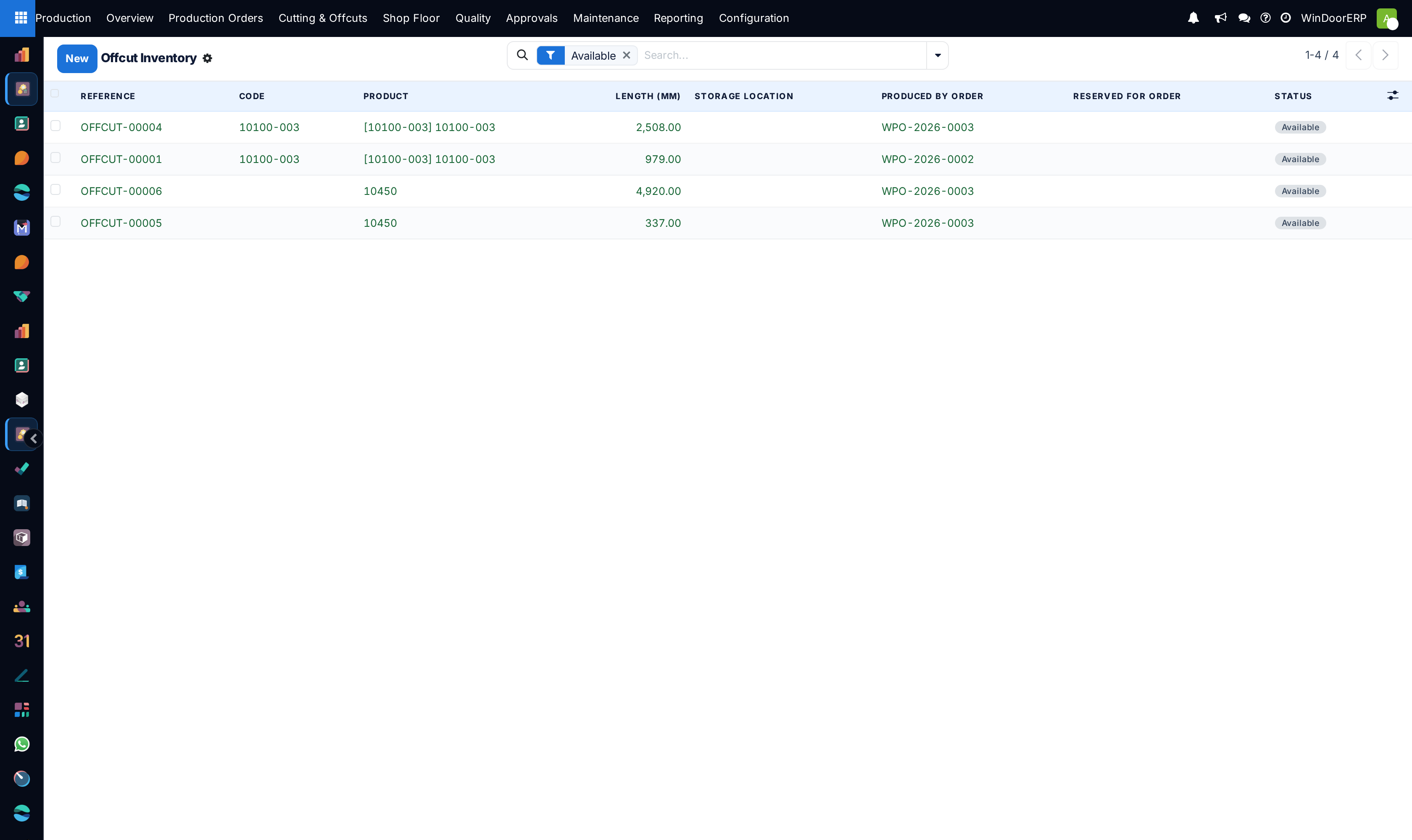
Check Cutting & Offcuts › Offcut Inventory: the remnants this order produced are there as Available, and the ones it borrowed show Reserved with the order's name — they flip to Consumed when the order is confirmed.
-
05
For glass, press Nest Glass: panels are packed per product and specification onto sheets — 3210 × 2250 mm and kerf 5 by default, fixed values on the plan itself — and remnants at least 300 mm on both sides land in the Glass Offcut Inventory (that minimum is the system parameter
windoor_production.glass_offcut_min_mm).
How the optimizer works
- Identical cuts (same length and end angles) are collapsed and packed together — big quantities of identical items nest essentially perfectly; many different items are the hard case.
- The strategy is picked from the problem size: an exact pattern algorithm for small jobs, a hybrid for medium ones, a fast heuristic beyond that — and an optional external ILP solver when an administrator has enabled it and its library is installed. The plan records which one ran.
- Offcuts are consumed shortest-first, and end trim is not charged on offcut bars — a remnant was already trimmed.
- One plan per product and category; each pattern row multiplies across its Bars (×) identical bars.
The offcut inventory
Offcut records are a length-indexed register, deliberately outside warehouse stock — no stock quants are created, and the Storage Location is purely informational. A row's states run Available → Reserved → Consumed, plus Scrapped; the list opens pre-filtered to Available. One row can stand for several identical pieces — the reference reads like OFFCUT-00004 · 10100-003 · 2508mm ×3, and the ×N in the name is the only place that count is visible.
| Button / transition | What it does |
|---|---|
| Scrap | Writes the row off. Consumed rows are silently left alone. |
| Restore to Available | Undoes a scrap. Consumed rows cannot be restored — the metal was genuinely used, and restoring it would invent phantom inventory. |
| Reserve / release / consume | Automatic: Optimize Bars reserves, re-optimizing or cancelling releases, and confirming the order consumes. A partially used quantity row is split so the remainder stays available. |
Note
Glass offcuts are currently a one-way record: harvested into the Glass Offcut Inventory by Nest Glass, but not yet drawn on by later nesting runs — treat that list as a manual picking aid for the glass table. Note also that editing a glass plan's sheet size or kerf does not re-nest the pieces; run Nest Glass again instead.
Troubleshooting
| "This production order has about … distinct cut sizes to optimize, above the current limit of …" | The safety cap (Max Distinct Cut Sizes in Settings, default 20,000) tripped — this means very many different items in one order. Split the order; identical items in quantity are not the problem. |
|---|---|
| "Piece length … mm exceeds usable fresh bar length … mm. Check the product's Standard Bar Length or End-Trim setting." | A required piece cannot physically fit the configured bar. |
| "Cannot reserve offcut(s) that are not available: …" | Another order took the remnant between planning and reserving. Re-run Optimize Bars. |
| "Optimize Bars: … offcut(s) previously produced by this order are now reserved or consumed by downstream orders and cannot be rolled back: …" | Re-optimizing tried to retract remnants other orders already claimed; they stay with their takers and this order plans around them. |
| "This order is large, so bar optimization is running in the background. …" | Not an error — the background run usually starts immediately and plans appear when it finishes. Progress notes land in the chatter. |
| "… panel(s) exceed the sheet size and were NOT nested — cut them manually." | Oversize glass is left off the plans deliberately. |
Common mistakes
- Optimising per window instead of per batch — pieces from several units of the same profile nest far better together.
- Leaving the default bar length on a product whose real stock is longer, wasting the difference on every single bar.
- Ignoring the kerf and end trim settings, so the last piece on each bar comes up millimetres short.
- Scrapping long remnants at the saw that the system just booked as available stock — the next order will plan on metal that no longer exists.
- Optimising a job that is about to change. Run it once the design is frozen; every rerun reshuffles the reservations.
Checkpoint
The optimisation produces a bar-by-bar plan, and you can see how much of each bar is scrap.