Price it and send it
Apply the customer's pricing
Why this step
Discounts belong in a pricelist, not in typed-over unit prices — that is what keeps next month's margin report honest.
What this does
Applies the customer's agreed pricing to the order, and gives you a controlled way to concede money without quietly detaching the price from the specification that justifies it.
Before you start
- Know which pricelist the customer is on — it comes from their contact record onto every new quotation.
- Understand which lines you are pricing: catalogue lines follow the pricelist, fabricated lines are priced by the price engine from the design.
Steps
-
01
Open the quotation and check the Pricelist in the header.
-
02
Change it only if this order is genuinely on different terms. Nothing re-prices at that moment — an Update Prices button appears beside the field.
-
03
Click Update Prices and confirm, and every line is recomputed against the new pricelist.
-
04
For fabricated lines, use Recalculate Prices below the line list to re-run the price engine after design changes.
-
05
Check the totals, then save.
How a price is decided on each kind of line
| Line | Where the price comes from |
|---|---|
| Catalogue | The pricelist: its rules turn the product's sales price into this customer's price — a percentage off list, a fixed price, or a formula, optionally with quantity breaks. |
| Fabricated | The price engine attached to the product. It calculates from the design — profiles, glass, hardware, the system amount the analysis produced — and writes the result into the unit price. The pricelist does not apply on top of it. |
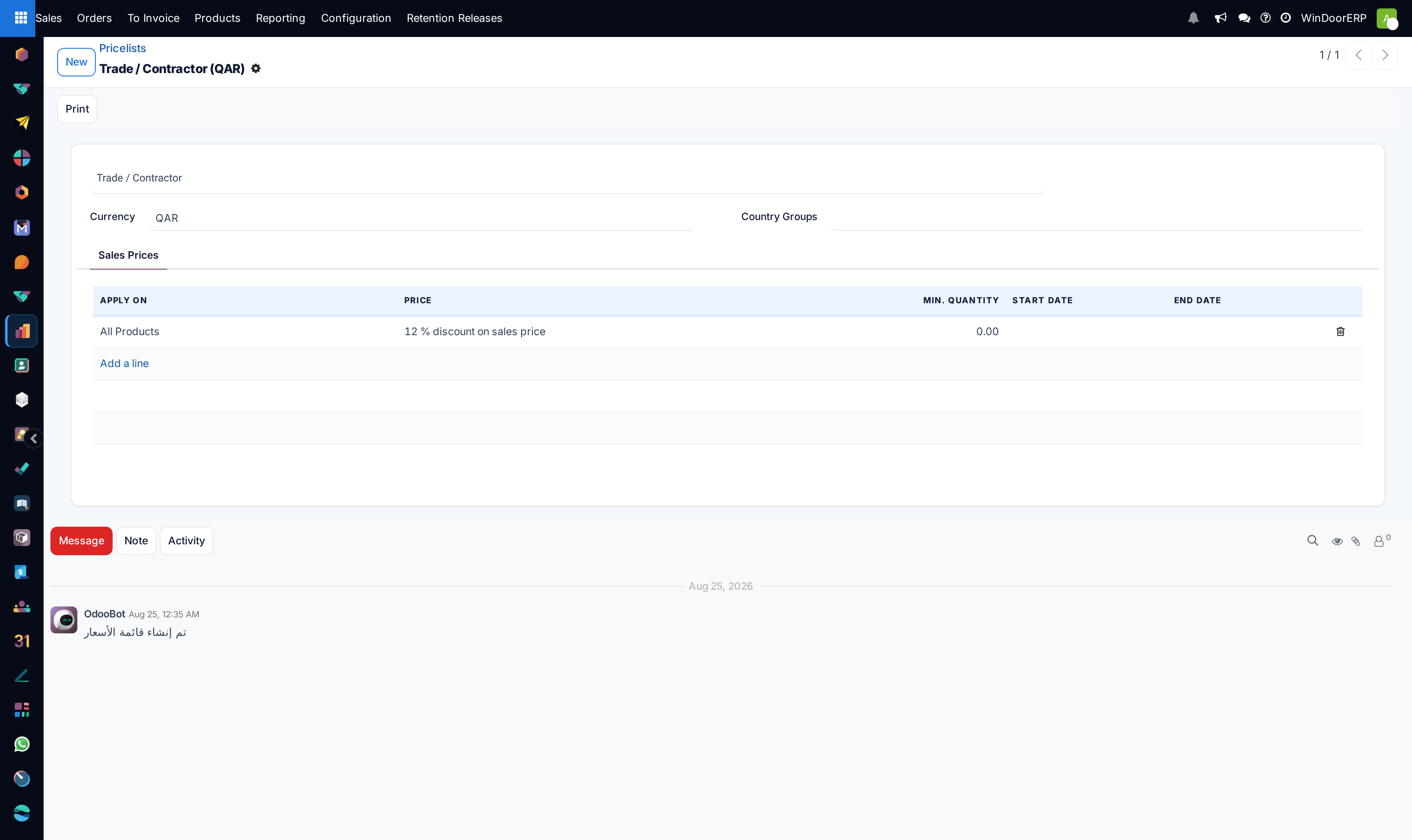
A pricelist is the honest place to hold a customer's terms: the rule says 12% discount on sales price for all products, and every quotation for that customer prices the same way without anyone remembering to type anything. Contract and trade rates belong here, not in per-line edits.
Conceding on price, without losing the evidence
WindoorERP is set up without a per-line discount column, so a concession is made in one of two places, and both leave a trail:
- The pricelist — the right answer for anything that applies to the customer or the contract rather than to one quotation. It is visible, reusable and reportable.
- A discount line — a negative-value line for a one-off concession on this order, described in words on the document so both sides can see what was given.
Important
On a fabricated line the unit price comes from the price engine, calculated from the design. Typing over it marks the line as manually overridden and the engine stops maintaining it — so a later design change silently stops updating the money. If you must override, do it knowingly and re-check the line whenever the design changes.
Tools below the line list
| Button | What it does |
|---|---|
| Update Prices | Appears beside the pricelist after you change it. Recomputes every line to the new pricelist — and resets manual adjustments in the process. |
| Recalculate Prices | Re-runs the price engine over the fabricated lines, with a choice about what to do with lines you overrode by hand. |
| Distribute Amount | Spreads a target total across the lines. Powerful and blunt: it is how a round number gets reached, and it records itself on the Price Distribution tab. |
| Explain Price | On a fabricated line, shows which engine rule matched and the variables behind the number — the fastest answer to "why is it this much?" |
Troubleshooting
| Symptom | Cause and fix |
|---|---|
| Changed the pricelist and nothing happened | Correct — it only reveals Update Prices. Click that to re-price the lines. |
| Update Prices wiped adjustments made by hand | Expected: it recomputes from the pricelist. Re-apply the concession as a pricelist rule or a discount line so it survives the next re-price. |
| A fabricated line stopped following its design | Its price was typed over, so it is flagged as manually overridden. Use Recalculate Prices and choose to reset the override. |
| "Price engine actions cannot be applied to locked or cancelled orders." | The order is locked or cancelled. Unlock it (or work on a revision) before re-pricing. |
| The engine price returned but looks wrong | Use Explain Price to see the matched rule and its inputs; the usual cause is a design that has not been re-analysed since it changed. |
Common mistakes
- Discounting by typing over unit prices. It looks like the list price afterwards, and nobody can tell later whether it was a concession, a mis-key or a special rate.
- Changing the pricelist late in a long quotation and clicking Update Prices without re-checking the lines that were adjusted deliberately.
- Assuming a pricelist covers fabricated lines — the engine prices those from the design, and the pricelist does not apply on top.
- Reaching a round total with Distribute Amount and not telling the customer which lines moved.
Checkpoint
The discount shows in its own column, and the unit price is still the list price.