Read the five reports
See what you hold and what it is worth
Why this step
The headline report: quantity and value, at a date. Run it at month end against the balance sheet figure, and any gap between the two is a conversation worth having before the auditor has it for you.
What this does
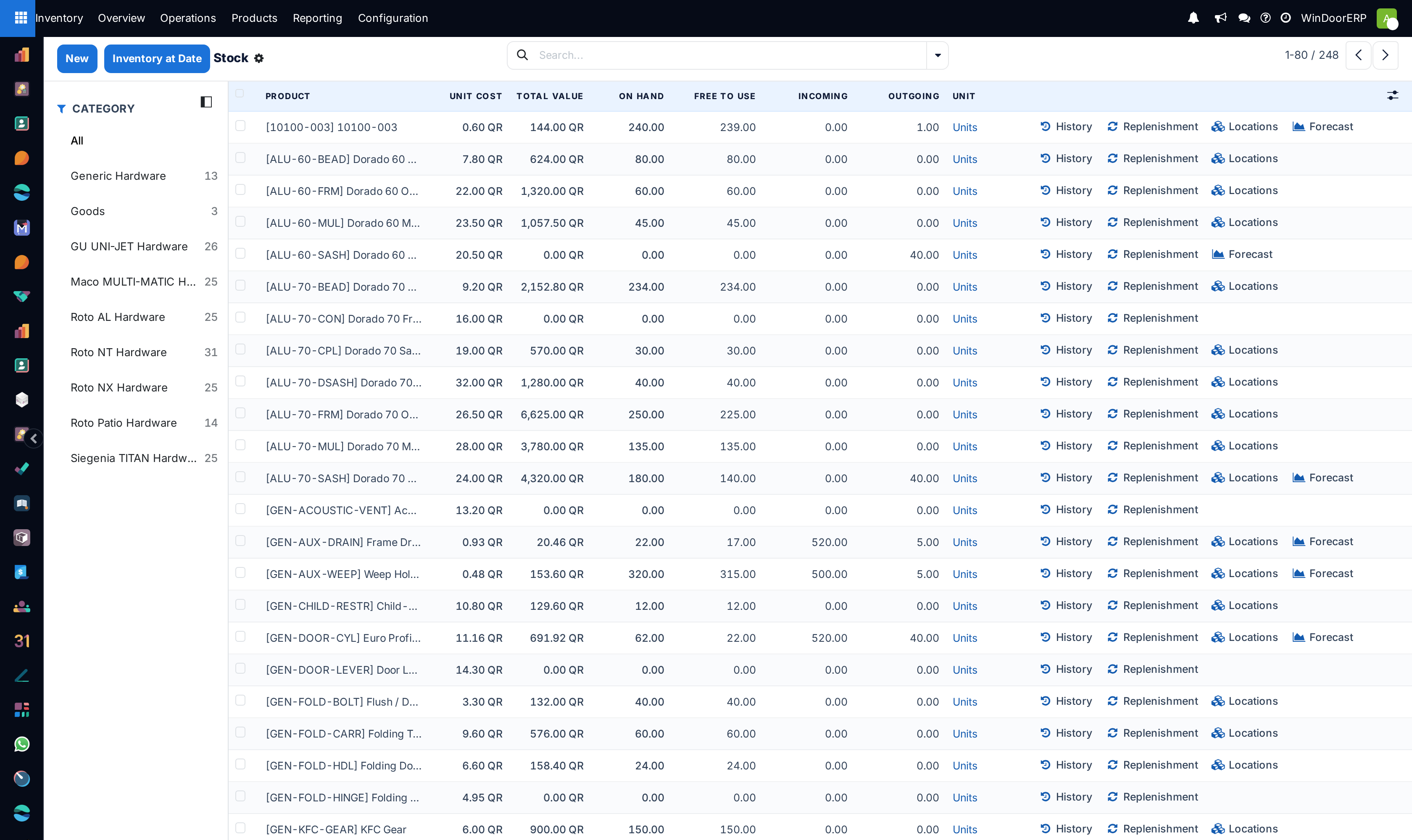
Inventory › Reporting › Stock is the one-line-per-product answer to "what do we hold and what is it worth": on-hand and free quantities, what is coming and going, the unit cost and the total value — live figures, computed the moment you open the screen, with drill-downs into every number.
The whole Reporting menu is for stock managers — if you cannot see it, that is the reason, not a bug.
Before you start
- The Inventory Manager role.
- Honest Cost fields: everything here is standard-costed, so Unit Cost and Total Value are exactly as good as the maintained costs.
Steps
-
01
Open Inventory › Reporting › Stock. It lists every storable product, unfiltered.
-
02
Narrow from the left Category panel, or with the filters — Available Products (only what has stock) and Negative Forecasted Quantity are the useful two.
-
03
Read the columns: On Hand, Free to Use (on hand minus reserved), Incoming, Outgoing, Unit Cost and Total Value. The quantities and Total Value carry column totals; Unit Cost does not — a summed unit cost would mean nothing.
-
04
Drill into any figure: On Hand opens the product's counting lines, Unit Cost its cost history, Total Value the valued incoming moves behind the number (with remaining quantity and value per receipt).
-
05
Use the row-end buttons to jump to the product's History (its moves), Replenishment, Locations (multi-location users) or Forecast.
-
06
For a balance-sheet date, press Inventory at Date, pick the date and confirm — the same list re-computed as of that moment. Its Unit Cost and Total Value columns start hidden; add them from the ⚙ column picker.
The columns, precisely
| Column | Meaning |
|---|---|
| On Hand | Physical quantity across internal locations. Clicking it opens the product's Physical Inventory lines. |
| Free to Use | On hand minus what transfers have reserved. |
| Incoming / Outgoing | Quantities on open receipts and deliveries. |
| Forecasted | On hand + incoming − outgoing (hidden by default — add it from the column picker ⚙). |
| Cost Method | The category's costing method (hidden by default) — Standard Price across this platform. |
| Unit Cost | The product's current cost. Its click-through, Unit Cost History, lists how the cost changed over time. |
| Total Value | What the holding is worth in company currency, totalled at the bottom. Its click-through, Valuation, opens this product's incoming moves that still have a remainder — reference, date, quantity, unit cost, remaining quantity and remaining value. (On FIFO categories the list shows each move's Value instead of the unit cost.) |
Note
The figures are live computes, not snapshots — two managers reading at different moments can legitimately see different numbers. And under this platform's periodic valuation the report is the operational value: the accounting ledger meets it at closing, not continuously.
Troubleshooting
| The Reporting menu is missing | It is gated to Inventory Managers as a whole — every report in it, not just this one. |
|---|---|
| Unit Cost / Total Value columns are absent | They are optional columns — enable them from the ⚙ column picker; they are on by default but a saved view may have hidden them. |
| Total Value disagrees with accounting | Expected between closings (periodic valuation), and whenever Cost fields are stale — the report multiplies quantities by the costs someone maintains. |
| A product is missing entirely | The report lists storable products only — services and consumables are out by definition. |
| The list shows greyed generic rows on a fresh database | Sample placeholder until real storable products exist. |
| The Locations row button is missing on some rows | It needs the multi-locations right and hides at zero quantity. |
Common mistakes
- Reading Total Value as the booked figure. Between closings it is the operational value; the ledger catches up at closing.
- Judging shortages from On Hand instead of Free to Use — reserved stock is spoken for.
- Exporting the list for a valuation date instead of using Inventory at Date, which recomputes history properly.
- Forgetting the figures move as you read them — for a signed-off number, fix the date with Inventory at Date.
Checkpoint
Your stock value on screen reconciles to the stock account in the ledger.