Decide how cost is calculated
Value it lot by lot
Why this step
Two containers of the same profile, bought three months apart, genuinely cost different amounts. Lot valuation keeps that distinction instead of averaging it away, which matters when you are asked what a specific tower consumed.
What this does
Two containers of the same profile bought months apart carry different real costs — and a finished window carries the cost of the exact material and labour that built it. "Value stock lot by lot" covers both ideas, and on this platform they live in two very different places.
Accounting-side lot valuation — WindoorERP 19's Valuation by Lot/Serial checkbox, which would give each lot its own cost — exists in the software but is out of reach here: it only appears on products tracked by lots or serials, and the lots-and-serials interface is not enabled for any user on this platform. Production-side serial costing is what actually runs: every serialized unit the factory builds gets a job-cost snapshot — material, labour and subcontracting — frozen against its serial number.
Before you start
- For the production-side story: the Finished-Goods feature on in Production, so completed units are received into stock with one serial each.
- A production role — the valuation screen lives in the Production app, readable by production users and managed by production managers.
Steps
-
01
Build and complete the order as usual: marking a production order Done receives each finished unit into stock under its own serial, and freezes that serial's job cost.
-
02
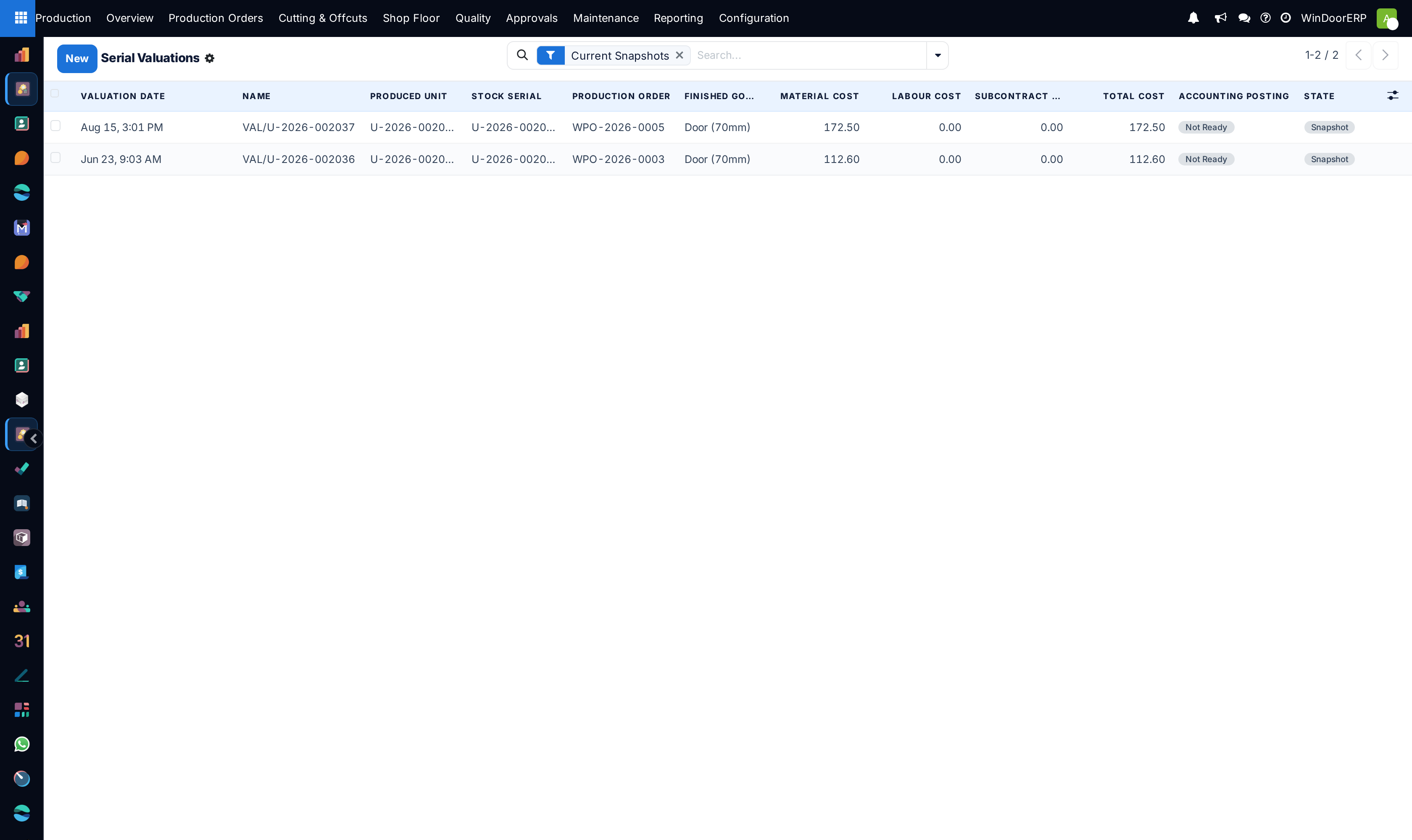
Open Production › Shop Floor › Serial Valuations — one snapshot per unit, opened on the Current Snapshots filter.
-
03
Read the cost split per serial: Material Cost, Labour Cost, Subcontract Cost and the Total Cost — plus an Overhead Cost column (hidden by default and always zero today) and the Accounting Posting badge.
-
04
Need a fresh figure after rework? The unit form's Snapshot Valuation button freezes a new snapshot and marks the old one Superseded — history is kept.
-
05
To answer "which job used the expensive one", follow the snapshot's links: the produced unit, its stock serial, and the production order (and through it the sale) are one click each.
What the snapshot is — and is not
| Question | Answer |
|---|---|
| Where does the per-serial cost live? | On the valuation snapshot, and stamped onto the stock serial as WinDoor Actual Cost — an operational job-cost figure. |
| Does it post to accounting? | No — by design. The field's own description says it "does not post accounting valuation". A manager-only Prepare Posting / Mark Posted path exists on the snapshot for controlled hand-off to the ledger; nothing happens without it. |
| What feeds the numbers? | The unit's share of its item's material list cost, the labour logs recorded at the stations, and subcontract costs — the same figures the production order's Costing tab shows. |
| What about purchased stock (profiles, glass, hardware)? | It is valued at product level by the costing method — Standard Price here — not per lot. The core per-lot valuation would need lot tracking enabled first, which this platform does not use. |
Note
If lot tracking is ever enabled, the core checkbox is Valuation by Lot/Serial on the product's Inventory tab (visible once the product is tracked), and it refuses to switch on while tracked products hold untagged stock: "You cannot enable lot valuation because the following products have on-hand quantities without a lot/serial number: …". Until then, treat per-lot accounting valuation as not part of this platform.
Troubleshooting
| There is no "Valuation by Lot/Serial" checkbox on products | It only appears on lot- or serial-tracked products, and the lots interface is not enabled for any user here — so in practice it is never visible. |
|---|---|
| The lot itself shows no cost fields | The lot form's value fields render only for lot-valuated products; on this platform the per-serial cost lives on the Serial Valuations screen instead. |
| Serial Valuations is empty for an order | Snapshots exist once units are received — mark the order Done (Finished-Goods feature on), or press Snapshot Valuation on a received unit. |
| A snapshot shows zero labour | The floor recorded no labour logs for that unit's operations — the snapshot is only as honest as the terminal discipline. |
| Accounting asks why these values are not in the ledger | By design: they are operational job costs. Stock is valued by the costing method, and inventory accounting happens at closing on this platform. |
Common mistakes
- Following generic lot-valuation instructions ("enable Lots & Serial Numbers, tick Valuation by Lot/Serial…") on this platform — the interface those steps assume is switched off, and no error will tell you so.
- Reading WinDoor Actual Cost as the accounting value of the serial. It is the job-cost snapshot; the books value stock by the category's costing method.
- Comparing serials' costs across orders without checking labour completeness — a unit built during sloppy terminal use looks artificially cheap.
- Re-snapshotting after every small change and then citing the superseded figures — the Current Snapshots filter exists so reports use the latest one per unit.
Checkpoint
You can state the cost of a specific batch rather than an average across all of them.