Keep the count honest
Count by location, all year round
Why this step
One annual count that stops the factory is worse than a rolling count nobody notices. Schedule cycle counts by location so the figures stay true without a shutdown.
What this does
Replaces one enormous yearly count with small, regular ones: the hardware store every month, the profile racks every quarter. Errors are found while they are still small, and nothing has to stop.
Before you start
- Cycle counts are organised by location, so Storage Locations must be enabled in Inventory › Configuration › Settings (under Warehouse) and your racks and stores created as locations — the warehouse-setup journey covers that.
- Without storage locations there is still counting — the whole warehouse on the annual date — just no per-location rhythm.
Steps
-
01
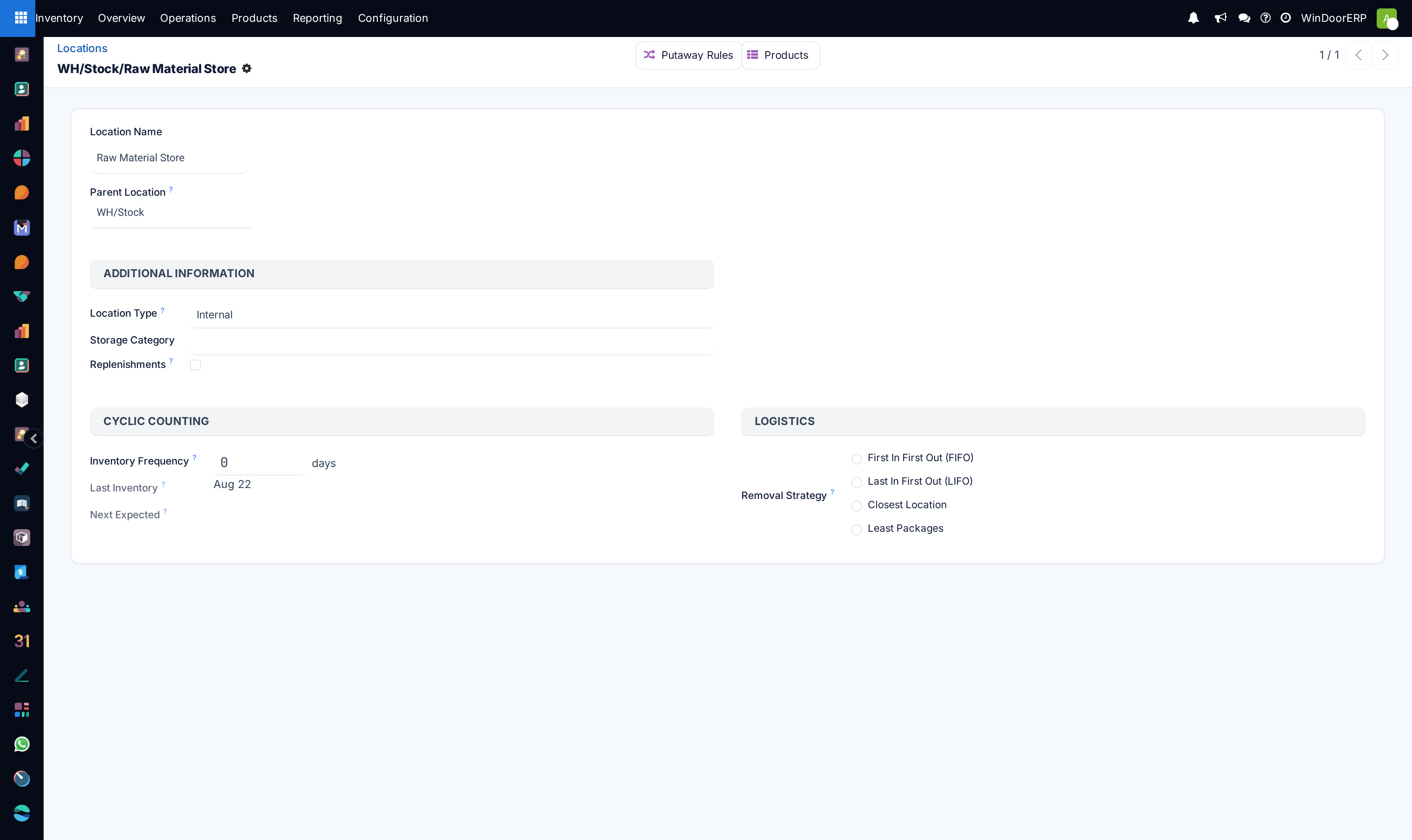
Go to Inventory › Configuration › Warehouse Management › Locations and open a location.
-
02
In Cyclic Counting, set Inventory Frequency to the number of days between counts —
30for monthly. -
03
Save. Next Expected fills in at once — the last count plus the frequency, or today plus the frequency if the location has never been counted.
-
04
Repeat for the locations that deserve their own rhythm, and leave the rest on the annual schedule.
-
05
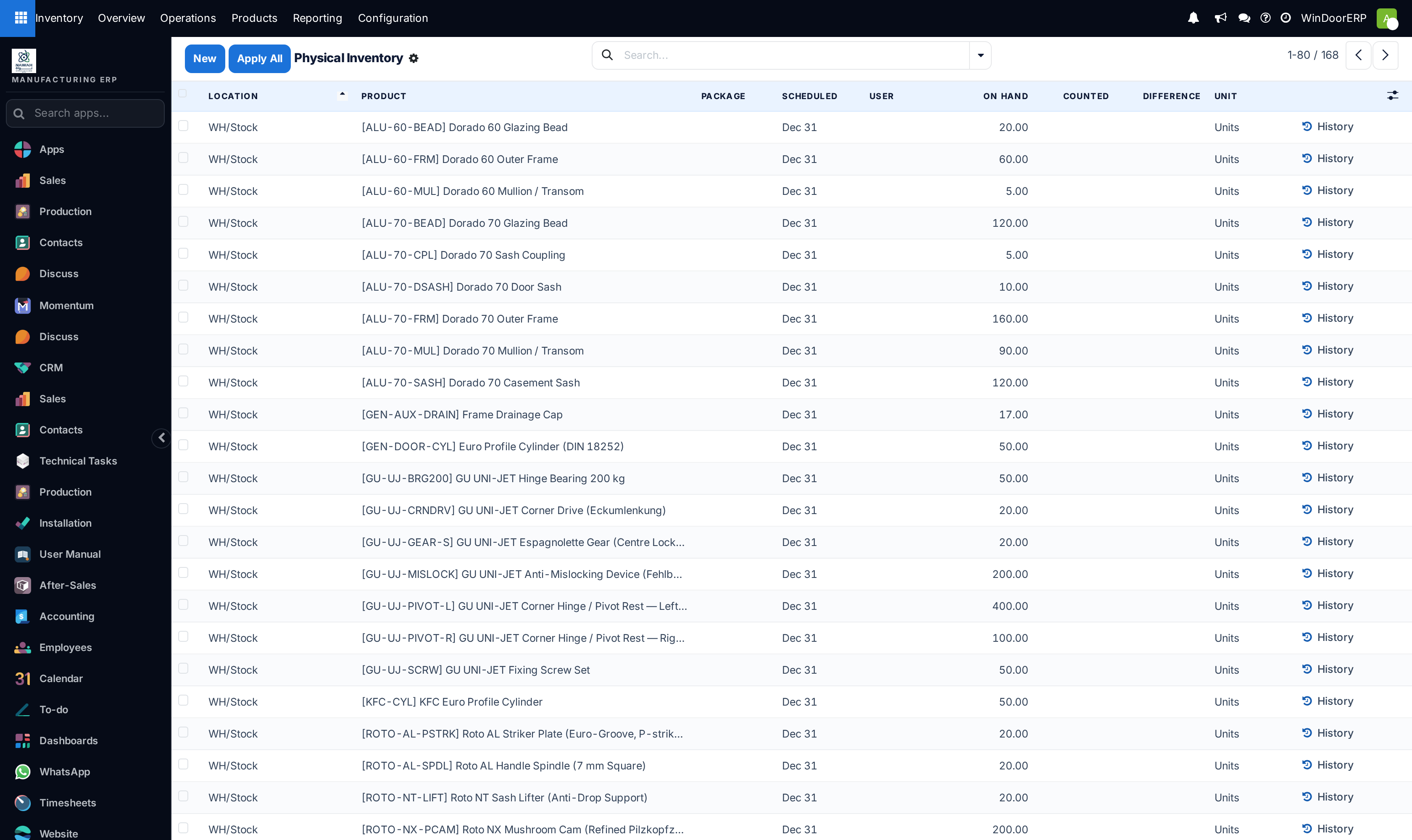
Count from Inventory › Operations › Adjustments › Physical Inventory: lines in cyclic locations carry their next date in Scheduled; type the real quantity into Counted and apply. Each applied count stamps Last Inventory and pushes the next date out by one frequency.
Count one location at a time
On the Physical Inventory page, open the search panel and choose Group By › Location: the list splits by location and each group can be counted on its own. In a big warehouse, a filter on Location is quicker — and the Scheduled column, sorted, is the counting calendar: whatever is due this week, count this week. The User column assigns a line to the person doing the counting.
Still do the annual count
Cycle counts keep the shelves honest; the yearly count keeps the accounts honest. Its date — the Scheduled default for every location without its own rhythm — is set under Inventory › Configuration › Settings › Operations › Annual Inventory Day and Month, 31 December unless you change it.
Choosing rhythms that work
Frequency should follow value and traffic, not the calendar's neatness: hardware bins that are picked daily drift weekly; sealed glass racks barely move. A workable pattern for a window shop — hardware and consumable stores every 30 days, profile racks every 90, glass stillages every 90, quarantine and returns weekly, everything else annually. The point of the rhythm is that no single count is ever big enough to need the shop to stop.
Troubleshooting
Next Expected is empty — the frequency is zero, or the location is not an internal one; only internal and transit locations carry a counting schedule.
The scheduled dates did not move after counting — counts must be applied, not just typed; it is the applied adjustment that stamps Last Inventory and re-computes the next date.
A location was missed and its date is in the past — it simply shows up as due now; count it and the rhythm resumes from today. Overdue does not escalate on its own — sort by Scheduled weekly so nothing hides.
The Locations menu is missing — Storage Locations is off, or your user lacks the storage-locations access; the setting adds both the feature and the menu.
Common mistakes
- Counting every location at the same interval. Fast-moving hardware and slow-moving glass do not need the same attention.
- Treating cycle counts as a replacement for the annual count — the two answer different auditors.
- Letting one person both count and apply their own adjustments in a high-value store, with nobody reading the Difference column.
Checkpoint
Every location has a count date, and the shelves are checked in rotation rather than all at once.