Win the job
Open the quotation
Why this step
The enquiry becomes a document.
What this does
Starts the document every other step hangs off. A quotation becomes the sales order, which drives the design, the production order, the delivery and the invoice — so what you set here is what the factory builds.
Before you start
- The customer must exist as a contact, with the delivery address you intend to use already on their Contacts tab — the order picks it silently and shows no address field of its own.
- Know which pricelist applies. Changing it later does not re-price anything by itself; it offers you a button that re-prices everything at once.
Steps
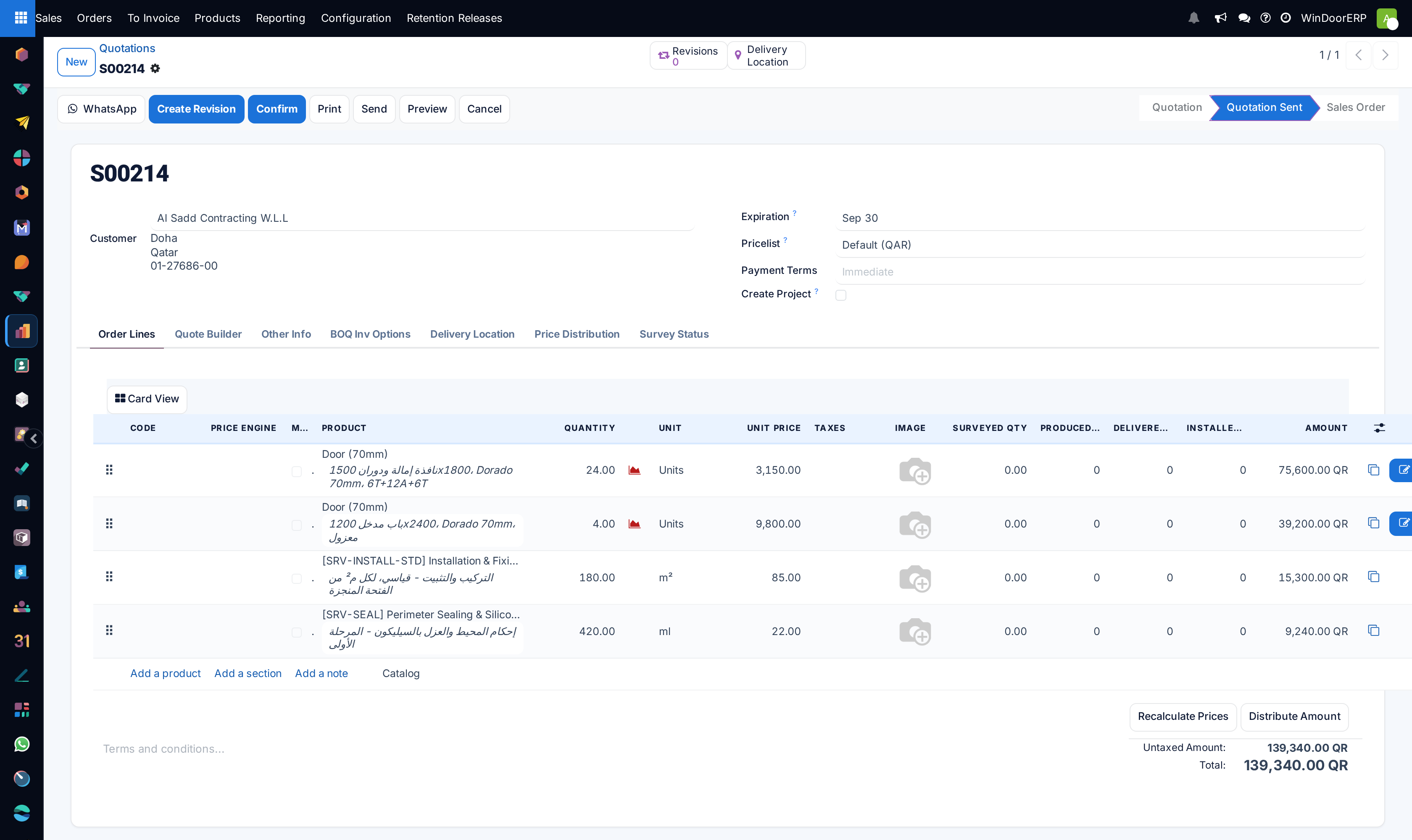
-
01
Open the Sales app and click New.
-
02
Pick the Customer. Payment terms and pricelist fill in from their contact record; the salesperson does too, or falls back to you if the contact has none.
-
03
Check the Expiration date — it pre-fills 30 days out. A window price that stands forever is a price you will regret.
-
04
On the Other Info tab, confirm the Warehouse the job ships from and the Delivery Date you are promising.
-
05
Add your lines: fabricated openings get a design (see Add a window to a quotation), catalogue items go straight into the line.
-
06
Save.
The two kinds of line
- Fabricated — a window or door you configure and make. It carries a design, an analysis, and its own progress columns through survey, production, delivery and installation.
- Catalogue — handles, sealant, trims, a service charge. Ordinary product lines that ship the ordinary way.
Which one a product is comes from the product itself: a fabricated product is set up with a design type, and that is what puts the design buttons on the line. You cannot turn a catalogue line into a fabricated one by wishing.
What the tabs hold
| Tab | What lives there |
|---|---|
| Order Lines | The lines themselves, plus per-line Code, image, price-engine columns, and the four progress columns — Surveyed Qty, Produced Qty, Delivered Qty, Installed Qty — that let you read a job's real state from the order. |
| Other Info | Salesperson, sales team, customer reference and tags; the Warehouse and Delivery Date; and Create Project (on by default) with its installation project template. |
| BOQ Inv Options | Contract parties, retention and variation settings for progressive billing — see Invoice a project progressively. |
| Delivery Location | The site pin: coordinates, a map, and a QR code the crew can scan. |
| Price Distribution | A log of amounts distributed across lines by the price tools below the list. |
Revising instead of overwriting
Create Revision freezes the current quotation and gives you a numbered copy — S00206-R01 — to negotiate on. The original stays readable, which is the difference between a revision history and an argument. Revisions are only possible while the quotation is a draft or has been sent; once it is a sales order the button refuses with "Only draft or sent quotations can be revised."
What confirming actually does
Confirm turns the quotation into a sales order and does exactly three things beyond that: it snapshots each line's price and quantity as the baseline for later contract revisions, it runs the ordinary stock rules for catalogue lines only, and — if Create Project is ticked — it creates the installation project. It does not start production, book a survey or raise an invoice; each of those has its own trigger later in the flow.
Note
Fabricated lines deliberately create no delivery order at confirmation. They ship on the finished-goods delivery once production is done, which is why a quotation full of windows shows no picking on day one.
Troubleshooting
| Symptom | Cause and fix |
|---|---|
| "Some order lines are missing a product, you need to correct them before going further." | A line has text but no product — usually a half-typed line. Give it a product or delete it. |
| The salesperson is you, not the account manager | The customer's contact record has no salesperson, so the order fell back to the current user. Set it on the contact and it will follow every future order. |
| No delivery order after confirming a window job | Correct behaviour — fabricated lines ship from production, not from the warehouse rules. |
| The design buttons are missing from a line | The product is not a fabricated one. Check the product's design type rather than the line. |
| The quotation shows an Expired ribbon | The expiration date has passed. Extend it or create a revision; nothing else breaks. |
Common mistakes
- Changing the customer after the lines are entered. Prices, currency and tax position all re-derive, and manual edits are lost quietly.
- Editing a sent quotation in place instead of using Create Revision, so nobody can reconstruct what was agreed.
- Leaving the delivery date empty and letting the customer assume the earliest one they can imagine.
- Assuming confirmation starts the factory. It starts the paperwork; production starts from the survey.
Checkpoint
A draft quotation exists against that customer, with your own reference on it.